March 14, 2007 12:03 AM
Broken: First Internet Bank of Indiana message
 Sean Santry writes:
I recently tried to log in to my bank's website,
The First Internet Bank of Indiana, to check my balance. I was confronted with a page with this message:
"Internet Banking is temporarily unavailable. Please try after Sometime. Thank you."
OK, I'll just wait until after Sometime to find out how much money I have in my account. Gee, thanks!
Posted in Web/Tech
| Permalink
| Comments (7)
March 9, 2007 12:03 AM
Broken: Citimortgage text field for customer questions
 Ryan A. MacMichael points out:
I went to ask a question of Citimortage through their web site and got the screen above.
So, wait... go ahead and ask a question, but don't use "non-allowed characters" like a question mark?!
See original post.
Posted in Web/Tech
| Permalink
| Comments (8)
March 3, 2007 10:04 AM
Broken: Searching on The Huffington Post
I went to the Huffington Post and tried to search on "tiki" (since Tiki Barber gave a great interview on Charlie Rose last week).
But the search results page said this:
Got an error: You are currently performing a search. Please wait until your search is completed.
I decided not to wait around.
(Instead, on the second try it worked fine... except that the search results are pushed waaay down the page, below all the text ads. There are better ways of designing such pages.)
Posted in Web/Tech
| Permalink
| Comments (1)
Broken: Islington shopping basket
 From Larsz's Flickr photostream:
When you pay a fine online in Islington (a part of London), you have to add it to a shopping basket. (See the website.)
At least they don't use Amazon-style recommendations. Imagine: "customers who were caught speeding also enjoy parking illegally."
Posted in Web/Tech
| Permalink
| Comments (10)
February 24, 2007 12:03 AM
Broken: Zune song transfer error
 From Michael Meiser's Flickr photostream:
"Welcome to the anti-social." :)
Posted in Web/Tech
| Permalink
| Comments (14)
February 16, 2007 12:03 AM
Broken: Association of International Glaucoma Societies website
 Barbara Young writes:
I came upon the web site of the Association of
International Glaucoma Societies and had to share it. I thought it was a spoof at first, but it isn't.
Check out the bobbing heads at the upper left, the
flying-in heading, the spinning globe in the middle, and the staring eyeball that
appears if you scroll down to the bottom of the left-side menu, and the fact
that you can't get back to the home page if you leave it without using the Back
button. Oh, and there seems to be no actual information about glaucoma on the
site.
Another funny feature in this site is the "Glaucoma Hymn" , which is on the lower right corner of the site I dare anyone to download the "hymn" and listen to it
all the way through. Here is an excerpt:
Glaucoma, Glaucoma,
Glaucoma
Constricting vision slowly
Halted by progress of
science
Vision of a world united
Beyond all science
knowing
Posted in Web/Tech
| Permalink
| Comments (11)
February 8, 2007 12:03 AM
Broken: iPhoto popup
 Which option tells iPhoto not to rebuild the thumbnails - "Rebuild Now" or "OK"?
C'mon, Apple, you can do better than this.
Posted in Web/Tech
| Permalink
| Comments (10)
February 3, 2007 12:03 AM
Broken: Yahoo thesaurus page
 The Yahoo thesaurus provides a good example of how not to focus a page on its primary goal. (How many dozens of distracting elements are on the page?)
Posted in Web/Tech
| Permalink
| Comments (6)
January 27, 2007 12:03 AM
Broken: Amazon "see larger picture" option
 Keith Klier writes in:
I was looking at a portable hard drive on Amazon.com and I wanted to show my wife a picture of it so she could get an idea of the actual size.
I clicked the "see larger picture" link, but found that the only thing bigger about the picture was the pop up window that contained the image of the hard drive - the picture of the hard drive was still the same small size it was in the original view!
Posted in Web/Tech
| Permalink
| Comments (7)
January 23, 2007 12:03 AM
Broken: Sign with website url
 David Barnes submits a picture taken in the UK:
I spotted this sign on a primary school display board with the website address UNCONDITIONALCOMPASSION.COM in all upper case, which is not broken in itself.
What is broken however, is that on the same sign, there is text underneath the url in all upper case that states "all in lower case."
Whoever printed the sign should have checked to see if web site addresses were case sensitive, (and they would have found out they weren't) before they printed the sign.
It is broken to make people think that website addresses are case sensitive.
Posted in Signs
, Web/Tech
| Permalink
| Comments (7)
January 17, 2007 08:56 AM
Broken: Unsubscribe Request
 There must a better way of designing an unsubscribe confirmation:
To unsubscribe [address] from this mailing list, click 'Continue'. Click 'Cancel' to keep your subscription active."
Posted in Web/Tech
| Permalink
| Comments (8)
Broken: Nextel phone selector
 Jason Sherrill points out:
When managing your phone's services at nextel.com, after logging in you are required to select your phone model from a grid of approximately 50 phones.
Unfortunately, the phones are not sorted in any alphabetic or numeric order. Furthermore, the pictures
of the phones are tiny, so it's hard to spot your phone on appearance alone.
It's a real pain finding your phone on this page.
Perhaps they could offer a simple alphabetic or numerically sorted drop-down list as an alternative for the users who know their phone model number - which you can easily see on the phone itself.
Posted in Web/Tech
| Permalink
| Comments (7)
January 12, 2007 12:03 AM
Broken: Non-linked sitemap
 Matt Baume points out:
I found this sitemap from the Millman Retirement Planning Center. It's a sitemap with absolutely zero hyperlinks. It tells you what all the names of the site's sections are, but doesn't provide any links to them.
Posted in Web/Tech
| Permalink
| Comments (3)
January 10, 2007 12:03 AM
Broken: Cancellation process for the New York Times electronic edition
 Brent Toellner points out:
This is a screen shot of my instructions when I tried to cancel my subscription to the electronic edition of the New York Times.
I registered for the paper online. I read the newspaper online. Now, knowing that I obviously prefer the online experience, they want me to cancel my subscription via the phone.
An online option to cancel my subscription should be available instead of requiring me to talk to a customer service representative over the phone and then having to provide all of my information to them again, when all my information is saved on their website.
Posted in Web/Tech
| Permalink
| Comments (10)
January 6, 2007 12:03 AM
Broken: Microsoft Excel "Help" for removing hyperlinks
 Alexa Weber Andrzejewski writes in:
I've been battling hyperlinks in my Microsoft Excel documents (because in Excel, entirely blank cells and black text that does not look like a link can remain or become hyperlinked accidentally) and decided to
search the Help documentation.
For removing a single hyperlink, you can right click and say "Remove Hyperlink" (which in some cases requires mousing over to actually locate the cells where your pointer becomes a hand, but it's a pretty
reasonable method otherwise.)
But to remove ALL the hyperlinks? Help says...
1. Type the number 1 in a blank cell, and right-click the cell.
2. Click Copy on the shortcut menu.
3. While pressing CTRL, select each hyperlink you want to deactivate.
4. Click Paste Special on the Edit Menu.
5. Under "Operation" click Multiply and then click OK.
What? First, this still requires finding and clicking on all the hyperlinks (just doing it to the entire spreadsheet doesn't work, and worse, makes a mess of some cells). But what really peeves me is that official Help documentation should have to contain hacks!
If it occurred to someone at Microsoft that this might be something users would want to do, why not fix the experience?
Of course you could always buy a $20 piece of software to do it for you: Excel Remove Hyperlinks Software 7.0.
Posted in Web/Tech
| Permalink
| Comments (9)
January 3, 2007 12:03 AM
Broken: DIRECTV online order form
 Mike Bunnell writes in:
I recently ordered an additional receiver for my DIRECTV system - a free offer as a 'valued' customer. When it came to the payment page, even though the order total is $0, I was required to enter a credit card before completing the order process.
Just to be clear, by this point I had already logged in with my account information, and was provided this
offer specifically based on my payment & service history.
Too bad nobody thought to program that information onto the apparently standard ordering interface.
Posted in Web/Tech
| Permalink
| Comments (4)
December 30, 2006 12:03 AM
Broken: Sprint payment kiosk
 A reader named Marvin submits a picture taken in Los Angeles, California:
At the Sprint Store on 3rd and Broadway in downtown Los Angeles, they
have a kiosk in which you can pay your bills by inputing your account information and inserting
dollar bills (similar to a vending machine).
You can clearly see a keyboard and trackball, however the keyboard and trackball don't serve any purpose because all data is input via the touch screen
interface.
What is the point of having the keyboard there if you can't use it to input data or navigate the system?
That being said, I wish the keyboard was usable, because touch screens aren't as easy to use, and are more prone to input errors.
Posted in Web/Tech
| Permalink
| Comments (11)
December 26, 2006 12:03 AM
Broken: Wake County polling places list
 Cheryl Smith points out:
Wake County in North Carolina only lists precincts with polling places in Excel format. Why couldn't the list be in html format so a voter could immediately view and print the polling places?
Posted in Web/Tech
| Permalink
| Comments (8)
December 22, 2006 12:03 AM
Broken: Bank of America state selection
 Evan E. points out:
In the sign in section of the Bank of America website, if you live in Guam, Puerto Rico or the Virgin Islands, you have to select "Alabama" as the state your account is in.
See also:
Broken: Bank of America jailing a customer
Posted in Web/Tech
| Permalink
| Comments (13)
December 20, 2006 12:03 AM
Broken: Gateway ink monitor
 Ronson Lamond writes:
Gateway computers come with software to remind you to buy ink cartridges
for your printer.
I received this low ink warning message for this printer called the Journal Note Writer - which only creates pdfs, which do not require the use of ink...I may have to run out and
buy some digital ink soon.
Posted in Web/Tech
| Permalink
| Comments (16)
December 16, 2006 12:03 AM
Broken: Epson Smart panel error message
 A reader named Thales writes:
I received this error message "an unamed file was not found" in the Epson Smart Panel - the application that accompanies the Epson Perfection 2400 Photo scanner.
Also, what amazes me is the fact that they expect the software to be able to find a file without a name in the first place.
Posted in Web/Tech
| Permalink
| Comments (11)
December 4, 2006 12:03 AM
Broken: Adobe error report form
 Marsha Glassner points out:
When you submit a bug report form to Adobe online, they ask that you write them how to reproduce the problem.
Once you have taken the trouble to write up a detailed explanation of how you encountered the bug, and you are ready to submit your report, the form tells you *after* you have completed the description, that you are limited to a description of 2000 characters!
Also, just to add insult to injury, they end their admonition to any customer who isn't concise enough with an exclamation mark!
Posted in Web/Tech
| Permalink
| Comments (4)
December 2, 2006 12:03 AM
Broken: Monster.com cover letter window
 David Newton points out:
A few months ago when I was applying for jobs on monster.com, I had to go through the process of putting together and editing a cover letter for submission with my resume.
In the picture above in the red box is the window you get once you've chosen to create a new letter (the option for uploading one directly is, sadly, missing).
Unfortunately, I had to edit my cover letter down in Word, because I couldn't really do it in the generous postage-stamp sized window that they're provided me with.
Posted in Web/Tech
| Permalink
| Comments (3)
November 30, 2006 12:03 AM
Broken: UPS credit card selector
 A reader named Jason S. writes in:
The ups.com shipping website lets you select a credit card from your profile to pay for a shipment.
Unfortunately, if you have more than one American Express card in your profile and the 11th and 12th numbers are the same on both cards, then you just have to guess which card your shipping fees will be charged to since you cannot see the remaining numbers.
UPS needs to make sure this drop-down field is wide enough to show the full detail necessary to make this feature useful.
Posted in Web/Tech
| Permalink
| Comments (6)
November 25, 2006 12:03 AM
Broken: Michigan State University Federal Credit Union online security option
 David Mulder writes:
I saw this message when I logged into my Michigan State University Federal Credit Union online account:
MSUFCU announces TrulyU, a new ComputerLine security feature. TrulyU adds another layer of protection to your account. Due to the high number of ComputerLine users, a limited number of randomly-selected accounts will be set for enrollment each day beginning on October 18.
Great! A new security feature to make my online account safer.
Too bad I have to be randomly selected before being able to activate it.
Why didn't they just introduce the option to me if I was randomly selected for the option. Otherwise, don't notify me about the option unless it is currently availble to me!
Posted in Web/Tech
| Permalink
| Comments (3)
November 21, 2006 12:03 AM
Broken: Mellon investor services signup
Andrew Midkiff writes:
There are several layers to this broken experience with signing up for Mellon investor services online. First, it starts with an envelope from a recent mailing telling me to visit " www.melloninvestor.com/isd."

When you type that URL in a browser, you get a 404 "page not found" error.

I knew enough to try it without the isd and eventually found the URL at https://vault.melloninvestor.com/isd/Default.asp?PLID=MEL.
I didn't have an account set up yet, and so I needed to get a PIN. The next picture shows the way to get a PIN. So far, I was doing ok.

I then got the following picture which is the error telling me that I've either not gotten a PIN yet, I've entered an invalid investor ID number (entered incorrectly or used a social security number), or I've entered an invalid PIN.

The last bullet point, about exceeding the maximum login attempts, is confusing. Is it telling me that one possible problem might be that I've exceeded the number of log in attempts? or is it telling me that is the case? I'm not sure...
The only one of these reasons that can possibly be true for me is the second option - "You have entered an invalid Investor Identification Number (Investor ID)." Since I know I didn't type in a social security number and a PIN had nothing to do with it since I didn't have one yet and was trying to get one.
So, I try again making very sure that I type in the investor ID# correctly. It's a 12-digit number with no dashes or spaces. I hit the button again, and get the same error.
I then tried to "Chat live" with a Mellon Help Desk Specialist and get the next image telling me that the help desk has gone home for the night. Why offer me the help desk live chat option if it isn't available!?!

Mellon investor services gave me a bum URL and the application failed when I did everything correctly. I even tried their site on both Firefox and IE, just in case, and it didn't work in either browser. Then they wouldn't let me get any help because it was 7:12 p.m, when most people are doing such investor-related things.
Posted in Web/Tech
| Permalink
| Comments (6)
November 18, 2006 12:03 AM
Broken: BestBuy.com store locator
(Best Buy fixed their store locator - it now shows you what stores are within the proximity of your zip code, it no longer re-directs you to the Microsoft Windows mobile page. Good job Best Buy!)
 Nick Srinivasan writes in:
I was on the Best Buy website trying to locate a store near my neighborhood. On the store locator page, after you input your zip-code under Store Locator and click "Go" to see the results, you are then re-directed to a Microsoft Windows mobile page.
Nick Srinivasan writes in:
I was on the Best Buy website trying to locate a store near my neighborhood. On the store locator page, after you input your zip-code under Store Locator and click "Go" to see the results, you are then re-directed to a Microsoft Windows mobile page.
 The web developer must have forgotten to change a test link!
Posted in Web/Tech
| Permalink
| Comments (5)
November 13, 2006 12:03 AM
Broken: Pie chart in eWeek article
 Lore Eargle points out:
I was reading an article titled Outsourcing is Here to Stay in eWeek, and in the second part of the article there is a section that shows a pie chart displaying responses to the question - Is your company budgeting for outsourcing any IT activities to an offshore company in 2006?
Note the disparity between the numbers and the divisions in the pie chart on the far right - 65% is taking up less space on the pie chart then 35%.
Posted in Web/Tech
| Permalink
| Comments (6)
November 11, 2006 07:40 PM
Broken: Food Network Search
 The Food Network website has to deliver one thing, above all others: a decent recipe search engine. But the search engine is broken.
I searched for "chicken parmesan" and got...
- Penne with Sweet Potatoes and Fennel
- Minestrone with Crisp Parmesan Crumbs
- Grilled Polenta with Morel Vinaigrette
- Savory Spinach and Artichoke Stuffing
- Roasted Polenta with Garden Vegetables
- Butternut Squash with Thyme and Parmesan
... and the results page offered over a dozen more unrelated options before finally showing, at the very bottom of the page, chicken parmesan. (Spelling it "chicken parmigiano" was much the same, taking 15 results to get to an appropriate recipe.)
If I search for chicken parmesan, I'm pretty sure I don't want penne with sweet potatoes and fennel! Food Network should fix its search engine.
Finally, is it just me, or is it kind of gross to search for a recipe and see "New Excema Breakthrough" just beside the listings?
P.S. Of course, this isn't as bad as the New York Times' broken search results.
Posted in Web/Tech
| Permalink
| Comments (7)
November 9, 2006 12:03 AM
Broken: TIAA-CREF "Coming soon" email
 Seth Green writes: I received this email from TIAA-CREF that reads - "Coming soon...TIAA-CREF's redesigned website."
"Coming Soon" messages are bad enough when you come across them on the web, but getting them in your inbox is especially not useful.
They should send you the message when the website is redesigned.
Posted in Web/Tech
| Permalink
| Comments (4)
November 4, 2006 09:33 PM
Broken: Raw HTML in Apple popup
 In Apple's iTunes, a .Mac popup reminded me to update my credit card.
In bold red letters, the popup reads:
Please check your spelling or go to .Mac to get a <a href="http://www.mac.com/" target="_blank"> free trial or sign up now</a>.
This is broken: Displaying raw HTML in a common popup like a credit card expiration reminder. Fix it, Apple!
Posted in Web/Tech
| Permalink
| Comments (10)
Broken: Adding airtime on Tracfone website
 Alex B writes in:
I use a pre-paid phone from Tracfone. To add minutes, you buy a card that includes a PIN, then you go to their website to enter the PIN and add the minutes to your account (some phones let you do this on the phone instead of the web, but not my phone).
Once you start the "add minutes" process on their site, not only do you enter the PIN from the card, but you also have to enter a lot more number sequences into your phone (each ranging from 15-28 digits). This is certainly a pain, but maybe it's necessary, so it's arguable whether the fact that you have to enter these sequences itself is broken.
The attached picture shows how it works - the next sequence you must
enter is shown in blue, and sequences you've already entered appear
above it, crossed out. Each time you confirm you entered a sequence,
that sequence is crossed out and a new one appears below it.
But what is undeniably broken is this: Before you start, you aren't told how many sequences you'll have to enter, and each time you enter a sequence, the site never tells you how many sequences are left.
You just have to enter each sequence it tells you to enter, until you're done. It's a tedious process and by the time you're near the end, you aren't sure if it'll ever tell you to stop.
This violates a basic principle of user interface design, which is that when you need the user to go through a sequence of steps, you must always tell them how many steps there are before they begin, and once they are in the process, tell them what step they are on.
Posted in Web/Tech
| Permalink
| Comments (8)
November 3, 2006 12:59 PM
Broken: John Battelle's Searchblog: Rant: The Comcast HD DVR Is Simply, Terribly Awful
A good rant from John Battelle comparing TiVo and his Comcast DVR. From The Comcast HD DVR Is Simply, Terribly Awful:
I love Tivo. I have written about it here many times. I love its approach to user interface, I love its corporate attitude (I know it can't keep it up given the reality of the market), and I even love its shortcomings. It's the Macintosh of television.
And Comcast, Lord knows, is the Windows. And not Windows 3.1. Windows 1.0. Or worse, if there is such a thing.
Also see: Study in Comcast branding
(Thanks, bb)
Posted in Web/Tech
| Permalink
| Comments (6)
November 2, 2006 12:03 AM
Broken: CNN website default search setting
 Joshua Shields points out:
The search feature default setting on the CNN website is broken. Sure, it has the same problem that all news sites are notorious for - that the search function has problems locating strongly relevant results in response to what you typed into the search box.
However, the CNN.com search has something else wrong with it. Like at most websites, you are given the choice to search just the website you are on or the entire web. What's broken here is that the default selection for the CNN site search is "The Web."
Therefore, *every time* I come to CNN.com, I enter something into the search box then I realize that I forgot to change the search setting to "CNN.com." So I have to start my search over again.
If I'm going to CNN.com, it is more likely that I want to search for an article on CNN.com, not the entire web. It would make more sense to make the search default "CNN.com" as opposed to "The Web."
Posted in Web/Tech
| Permalink
| Comments (7)
October 30, 2006 12:03 AM
Broken: Best Western e-mail unsubscribe
 Joe Rybicki points out:
Attached is a photo of the beginning of the ridiculously long unsubscribe form/survey that Best Western directs you to when you click the unsubscribe link at the bottom of one of the e-mails they
automatically send out to anyone who has ever booked a room with them
online.
Which of these options for unsubscribing would you be most likely to first choose?
1. Select this option if you do not want Best Western, its affiliates and subsidiaries (the "BW Companies") to communicate with you via e-mail about the Bestwestern.com promotions and special offers.
2. Select this option if you do not want the BW Companies' related travel partners to communicate with you via email about promotions and offers related to the Gold Crown Club International newsletter. (Includes monthly statement).
3. Select this option if you do not want to receive any communications via e-mail from the BW Companies or its travel partners regarding all Best Western and Best Western related promotions and offers. [Checking this box will mean that you no longer receive Best Western surveys, Gold Crown Club International communications, Best Western Travel Card communications and/or any other Best Western offers]
Which one do you think will actually fully unsubscribe you? Careful -- remember to check your work.
Posted in Web/Tech
| Permalink
| Comments (12)
October 25, 2006 12:03 AM
Broken: Harris Poll navigation
 Jeff Chausse writes in:
I was invited
by Harris Poll to fill out an online satisfaction survey, run by Harris Interactive.
It's a typical multi-page survey, but the "Next" button is on the lower left corner of the screen and the "Back"
button is on the lower right corner of the screen - the survey would be easier to use if the locations of the navigation buttons were switched.
Posted in Web/Tech
| Permalink
| Comments (18)
October 21, 2006 12:03 AM
Broken: Windows Explorer error
 Nick Paton points out:
Windows Explorer stopped responding and this window came up. The window presents reasonable options until the last choice - "Wait for the program to respond."
If the program really wasn't responding, it wouldn't magically start responding again. To make matters worse, if you click the "Wait for the program to respond" link the window disappears and than two seconds later it comes up again!
Posted in Web/Tech
| Permalink
| Comments (16)
October 14, 2006 12:03 AM
Broken: Chevy Chase Bank e-statements
 A reader named Kim points out:
Chevy Chase Bank just recently gave customers access to electronic
statements online, but the list of statments is in order ascending by
date.
What are the chances that I want to see the oldest statment
available to me? It is much more user-friendly to have the most recent statements at the top and the oldest statements at the bottom. I shouldn't have to scroll to see the most recent
statment.
Posted in Web/Tech
| Permalink
| Comments (10)
October 10, 2006 01:48 PM
Broken: Synopsis on PHC film website
 I'm a fan of Prairie Home Companion - the show, the movie, and its host "GK" - but not of the film's website.
Just one example: the synopsis is shown in Flash text (ouch) in a scratchy typewriter font, in a tiny size, in light gray text, on a slightly lighter gray background,... and then faded, to look extra old.
I've seen poorly displayed text, but this is really a humdinger. The designers of this site really, really don't want anyone to read the synopsis!
Hey designers: online, the ink is free - how about some contrast, and size, on the text?
See also: Past posts on this topic - 1, 2, 3.
Posted in Web/Tech
| Permalink
| Comments (8)
October 7, 2006 12:03 AM
Broken: Mobile Marketing Association search term limit
 Roland Reinhart writes in:
I visited the Mobile Marketing Association Web site www.mmaglobal.com and found the site search function to be very odd.
The site search explicitly states "Keywords shorter than 5 characters will be ignored"
Well, typical keywords for mobile marketing include: SMS, MMS, WAP, PSMS, TXT, text - all of which are 3-4 characters long.
This just struck me as not very user friendly.
Posted in Web/Tech
| Permalink
| Comments (11)
September 30, 2006 12:03 AM
Broken: Disney Interactive packaging
 Jack Moffett writes in:
My daughter just received a software game called "Disney Princess: Magical Dress-Up" for her birthday from a friend. As soon as she unwrapped it, we checked to make sure it was Mac compatible. As you can see in the picture, the box clearly indicates that it is indeed Mac compatible, and lists the system requirements. The disc was also printed with a label indicating that it will run on a Mac.
Later, when I inserted the CD-ROM, there didn't appear to be any Mac files, let alone an installer, on the disc. I checked the installation instructions printed on the back of the envelope the disc was in, which said to run the Mac installer. I checked their support site, which also said to double-click the Mac OS X installer found on the disc.
Perplexed, I sent an email to their support address. Below is the response I received:
Dear Jack,
Thank you for writing.
The disc for The 2004 Disney Princess Collection was rebuilt to exclude
the Macintosh side. Even though the Magical Dress-Up CD is labeled as
being compatible with both OS's, it is only compatible with Windows.
This issue can be remedied by getting the Macintosh compatible version
of the program. Once we confirm that you have the new version, (PC Only)
we will send you out the Macintosh compatible version free of charge to
you. To provide us with that information please note the serial number
on the top side of the disc.
Unfortunately, there was nothing resembling a serial number on the disc.
When a product is updated, its packaging should be updated as well!
Posted in Web/Tech
| Permalink
| Comments (12)
September 23, 2006 12:03 AM
Broken: Officedepot.com product image
 Creed Combs submits a screenshot taken from Officedepot.com's website:
The picture on this page is definitely a surge protector and not a Cat 6 cable like the site describes.
Posted in Web/Tech
| Permalink
| Comments (5)
September 16, 2006 12:03 AM
Broken: Air New Zealand In-flight entertainment system
 Jon Beattie writes:
Getting the Windows CE boot screen at 30,000 feet is a little broken.
Posted in Web/Tech
| Permalink
| Comments (16)
September 9, 2006 12:03 AM
Broken: Verizon Blackberry support site
Ben Sjoberg writes in:
I was trying to remove an annoying signature that is attached to all outgoing messages from my BlackBerry.
A search on the Verizon web site gave me a seemingly simple solution: click the Options button.

I follow the link and log in, however the Options button is nowhere to be found:

I called Verizon tech support, and they gave me the same instructions about the Option button. After the representative realized that there wasn't such a thing, I was forwarded to level 2 tech support. Apparently they had recently changed their system, but the instructions hadn't been updated yet.
Posted in Web/Tech
| Permalink
| Comments (9)
September 2, 2006 12:03 AM
Broken: Chase Online page
 A reader points out:
I got this interstitial page when logging on to my Chase credit card account. The only option is to go to my account page, which is what I asked for in the first place.
I'm glad that the Chase site is giving me the option to not see this page again, but why did it show me this page to begin with?
Posted in Web/Tech
| Permalink
| Comments (6)
August 30, 2006 12:03 AM
Broken: Universal Export dog decal ordering
 Mark Nicely points out:
Both in their print ads and website, Universal Export arranges their dog breed decals by their order codes instead of what would be useful to a buyer - which would be alphabetically by breed.
Posted in Web/Tech
| Permalink
| Comments (10)
August 25, 2006 12:04 AM
Broken: Dell keyboard-failure error
 A reader points out a keyboard-failure error that instructs the user to type F1.
Uhh, striking a key doesn't work. That's why it's called a keyboard failure!
Posted in Web/Tech
| Permalink
| Comments (17)
August 24, 2006 12:33 AM
Broken: New York Aquarium website
 Laurie Kalmanson writes:
I went to the website of the New York Aquarium in Coney Island and read that "times are posted at the aquarium main entrance and plaza area."
So I imagined my visit to the aquarium going like this:
"Oh, look -- the sign says the penguins were fed two hours before we got here."
This is basic information a visitor would want to know, and should be available on the website so you can plan your visit accordingly.
Posted in Web/Tech
| Permalink
| Comments (6)
Broken: HP's non-underlined links
 On this page, HP shows black text (non-clickable) and blue text (non-clickable).
Only if you look really closely, or hunt around by dragging your mouse around the page, can you tell that the text in between those colors, the blue-black text, is clickable. Since it's not underlined, there's no other way to tell that it's a link.
I know it's declassé for Web designers to underline links these days. (Heck, I should just be glad the text is black, not light gray.) But underlining does have that small benefit of allowing users to see where the links are. Users... remember them?
Posted in Web/Tech
| Permalink
| Comments (9)
August 19, 2006 12:03 AM
Broken: Hotel's Internet login
 Erik Dahl writes in:
There are two things going on here:
1. On the left side there are three service types to choose from, all of which are free.
2. On the right side, the place holder text is still there:
<------------- Hotel text begins here-------------->.
Now don't get me wrong, I appreciate the free internet access, and I worry that next time I go back to this Liberty hotel that there will actually be text on the right side of the page and the internet access will be something other than free.
Oh well, I don't mind jumping through a few usability hoops now and again if the result is free internet access.
Posted in Web/Tech
| Permalink
| Comments (24)
August 17, 2006 09:55 PM
Broken: American Express logout
 After logging out from American Express's website, it tells me that if I'd like to log back in, to "please lect the appropriate option from the LOG IN drop down at the top of the page."
Anyone have a guess where that might be?
There is a "log out" link, which does absolutely nothing, but there is not a "log in" dropdown.
For a global corporation like Amex, and for a common item like a logout screen, a mistake like this shouldn't happen.
Posted in Web/Tech
| Permalink
| Comments (3)
August 12, 2006 12:03 AM
Broken: Spreadshirt.com order status
Kris Arnold writes in:
I recently placed an order with Spreadshirt.com, a t-shirt retailer. The experience was mostly a good one, except for a small problem with their order status screen.
I am used to an order status like "Shipped" or "Pending," indicated with words. Here, though, status is represented with cryptic icons.
The yellow icon with white lines appears to mean "Pending."

and the green one with white lines and a red checkmark means "Shipped."

There is no explanation of these symbols via the FAQ or anywhere else that I could find on the site.
After seeing two of the symbols, I see what may be a yellow/green traffic light metaphor. (I suppose "Cancelled" is red with white lines. I wonder about "Back Ordered"...) But, before my order shipped, I saw just the first yellow status icon and I had no idea what it represented.
If they aren't going to use words for indicating an order status, then there should be a prominent key on the page indicating what each icon represents.
Posted in Web/Tech
| Permalink
| Comments (8)
August 2, 2006 12:03 AM
Broken: Logging off from Citimortgage.com
 A reader writes in:
When you click "log off" on citimortgage.com, the site asks: "Do you wish to continue?" If you click "no", you stay on the site; if you click "yes" (as in "yes, i wish to continue"), it logs you off. Each button does exactly the wrong thing.
This site probably cost several hundred thousand dollars to build, maybe even millions. Is this really the best Citibank can do?
Posted in Web/Tech
| Permalink
| Comments (18)
July 31, 2006 12:03 AM
Broken: United Airlines customer service link

Go to United Airlines' home page, click customer service - and get this... one category, guess what it is!
Posted in Web/Tech
| Permalink
| Comments (14)
July 29, 2006 12:03 AM
Broken: Marriott survey
 Klaus Johannes Rusch writes in:
The Marriott invites guests to participate in an online survey about their experience at the Marriott hotel restaurants. But it's impossible to fill out, for two reasons:
1. The survey's website address and access code are printed on the guest check, which the restaurant keeps when you leave. (I had to write them down on a separate piece of paper to even get to step 2.)
2. Once online, I could not get past the first question after I input the access code because, surprise, you also need to know the waiter number, which can only be found on the guest check.
There should have been clearer instructions on the guest check stating what information would be needed to complete the survey.
Posted in Web/Tech
| Permalink
| Comments (12)
July 25, 2006 12:03 AM
Broken: Delta flight status notification

This Just In: There are no alerts at this time.
It's great to be notified that there is no news.
Posted in Web/Tech
| Permalink
| Comments (5)
July 18, 2006 12:03 AM
Broken: Global weather simulation model


Brian D. submits a picture taken in Boston, Massachusetts:
I found this global weather simulation with an error message at the Museum of Science in Boston.
Posted in Web/Tech
| Permalink
| Comments (33)
July 5, 2006 12:03 AM
Broken: Conference dis-invitation
 Terry Jones writes in:
I received an email inviting me as a VIP guest to the "Email Insider Summit", which I thought would be interesting to attend. Shortly after receiving the invite, i received an email with the text below:
Dear Terrell:
We apologize if you received an email from MediaPost earlier today inviting you as our VIP guest to the Email Insider Summit.
That email was intended to be sent to a list of the 50 top brand marketers in the industry, that have already agreed to attend the event. The email below is the email you were intended to receive...
Being invited and then dis-invited to an event is definitely broken.
[Especially broken, in my opinion, is dis-inviting Terry Jones, founder of Travelocity - an Internet VIP if there ever was one! -mh]
Posted in Web/Tech
| Permalink
| Comments (18)
June 29, 2006 12:03 AM
Broken: Microsoft survey
 Cary Lee points out:
The question "Are there children present in your household?" gives two possible answers:
"Yes" and "No plans to purchase."
No, I have no plans to buy any children!
Posted in Web/Tech
| Permalink
| Comments (38)
June 26, 2006 12:03 AM
Broken: Dell email support
Jonathan Heimberg writes in:
I e-mailed Dell support the following request...
I need a system restore CD for an inspiron 5150 purchased in 2003. Thanks!
...and they wrote back the following note:
Dell's e-mail software interprets your message as a request for help
with buying an auto/air AC adapter for your Dell notebook computer.
To purchase an adapter to charge your portable computer from your car or
while in an airplane go to:
http://accessories.us.dell.com/sna/default.aspx?cs=19&c=us&l=en
* Click Notebook Accessories in the Browse For Products list
* Click Power Adapters and then choose Auto/Air
* Click the company name to see more details
If you have other battery questions please check our general battery and
AC adapter troubleshooting guide at:
ftp://ftp1.us.dell.com/diags/R66243.htm
Where in my "problem" do you see the keyword "adapter", "car", or "airplane"?
Dell email support needs to improve how their support database matches keywords from their customer's emails.
Posted in Web/Tech
| Permalink
| Comments (23)
June 22, 2006 12:03 AM
Broken: Disney.com comment form
 A reader named Daniel points out:
This is Disney.com's comment form. Which, when you read it, contradicts itself.
At the bottom it says, "If you don't enter a first name we can't put your message on TV or online."
Then it warns, "Careful, no personal information!"
Posted in Web/Tech
| Permalink
| Comments (32)
June 15, 2006 12:03 AM
Broken: McAfee personal firewall application message
 Arie Swartz points out:
This is an alert that McAfee personal firewall application triggered, stating that it did not recoginze itself and needed to ask for my permission to allow it access to the internet.
Posted in Web/Tech
| Permalink
| Comments (40)
June 10, 2006 12:03 AM
Broken: Thrifty car rental map
 Benjamin Emslie points out:
I just booked a car on Thrifty's website. I clicked on the map link and got this.
I really don't know how to leave, seeing as there are no roads. That being said, I'm not even sure how to get there!
Posted in Web/Tech
| Permalink
| Comments (26)
June 6, 2006 08:13 AM
Broken: Ticketmaster message
Seth Godin points out a silly message on the Ticketmaster website:
Your wait time is approximately 15 minutes or more
If you refresh this page or hit the back button, you will lose your place in line!
I agree with Seth's frustration here. As he writes...
Just went to buy some advance Amex tickets at Ticketmaster. This is the screen that comes up. I'm not IT guy, but what's powering their computer... gerbils?
Read the post at Seth's Blog.
Posted in Web/Tech
| Permalink
| Comments (13)
Broken: Software support process at HP
Alan Clarke writes:
I recently had the misfortune of needing to invoke HP's e-mail support system for a problem I had with my iPaq PDA.
I replied to an e-mail I received from support after I filled out their support web form and was surprised to receive a message a few minutes later telling me that the HP system had rejected my reply!
When I re-read the first communication from them more carefully, I was astonished to find that I had to do three totally separate things before my reply to support was acceptable.
1. I had to send my reply to a different e-mail address than the one I had received their message from.
2. I had to change the subject line entirely to exactly what they specified.
3. I had to excise all of the text from from the original *except* the two lines with my case ID and subject on it, and then I also have to make sure that these became the first two lines of my reply.
If I failed to do *any* of these, the system rejected my e-mail!
These guys really know how to make it hard to be a customer.
Posted in Web/Tech
| Permalink
| Comments (20)
June 2, 2006 12:03 AM
Broken: Lowe's password retrieval
 A reader named Max points out:
Since Lowe's changed their online credit payment system to include these requirements: "must be between 8-15 characters, must contain at least 2 numbers, and the numbers cannot be at the beginning or at the end," I forgot my new impossible to remember password.
When you click on "forgot password" it takes you to the secret question page. You enter your answer and then it tells you the user name is required. What is broken you may ask?
Well I had entered my user name on the preceding page but that information isn't passed to the secret question page and nowhere on the secret question page is there a field to enter your user name.
Also I can't reset my password without knowing the old one.
Posted in Web/Tech
| Permalink
| Comments (21)
May 29, 2006 12:03 AM
Broken: Amoeba records listening station
 Aynne Valencia submits a picture from San Francisco:
This user interface fouls San Francisco.
Do you know what is playing?
Do you know how to forward to the next song?
Do you know what the heck is going on here?
Noooo..
Neither do I
Neither did any of the kids I polled at the listening station.
This is not an interface - it is an acid trip.
I am at Ameoba almost every Saturday and this is driving me mad!
I am almost to the point where I would volunteer to fix this mess.
Posted in Web/Tech
| Permalink
| Comments (40)
May 26, 2006 12:03 AM
Broken: Promotions Gateway web ad
 Jeremy Coots points out:
I ran across this ad from Promotions Gateway offering 500 free music downloads (which of course is available only if I follow certain stipulations, as noted by the asterisk, although that is a different issue).
Anyway, if I did follow the requirements to receive the free music downloads, why would I need to have the music downloads shipped? The whole reason for downloads is that they take place online, there is no need to "ship" the downloads to a home address.
This seems just like a way for them to capture my mailing address so they can send me spam through snail mail.
Posted in Web/Tech
| Permalink
| Comments (27)
May 25, 2006 02:26 PM
Broken: NYT.com search
I like the New York Times site and know several of the people there - but I have to describe a pet peeve that has been nagging me for years: why, of all sites, can't the NYT's search engine perform a simple search?
I wanted to find the online version of the "top 50 conservative rock songs" that I saw mentioned in today's (print) Times, so I searched for "conservative".
 Here's what the Times found: nothing.
So I remembered the mention of Pete Townshend in the article and searched on "Townshend" - bingo, there's the article - with "conservative" in the title. 
And here's the article itself, with conservative in the title.
My question: am I missing something obvious, or is the NYT search broken? I searched for "conservative" and it couldn't find an article in today's paper with the word "conservative" in the title. This has been a problem for years on NYT.com and I finally thought I'd point it out.
Update August 16, 2006: Also see Broken: New York Times search results, posted today.
Posted in Web/Tech
| Permalink
| Comments (30)
May 23, 2006 11:44 AM
Broken: Unreadable text at Cooper-Hewitt
 Further suggestion that many designers today work in a thick layer of smog... everything in the Cooper-Hewitt online calendar is light-gray on a white background.
Hey designers: the ink online is free - and contrast is not a bad thing! Once in awhile people do actually want to read your text. Up the contrast, please.
Posted in Web/Tech
| Permalink
| Comments (37)
May 20, 2006 12:03 AM
Broken: Mysterious error message
Matt Baume writes in:
As soon as I logged on to my computer today, it gave me an error message that said, "Driver components mis-match. Exit is the only option." There was only an OK button to press.

Not only is that unhelpful, (which components?), it's confusing -- am I supposed to manually exit, or is the program exiting by itself? Sure, exit is the only option, but am I or the computer supposed to exercise that option?
I looked at my taskbar and saw the red gear icon. I know I've seen it somewhere before, associated with a specific application. Now, which one was it? Oh yes:

A clue! The mystery is coming undone! Well, somewhat. Now I've deciphered that my Folding-at-Home screensaver is to blame somehow. But how? Is this a problem with a driver? More than one driver? In the registry? With my user profile? Do I need to reinstall Folding-at-Home, or nVidia software, or OpenGL software?

Gah! Exit is the only option.
Posted in Web/Tech
| Permalink
| Comments (30)
May 16, 2006 12:03 AM
Broken: Webroot unsubscribe
 A reader named Grant points out:
Mysteriously, I have appeared on the mailing list of Webroot, which is a company that makes anti-spyware software.
In an attempt to remove myself from their list, I clicked on the "Remove Yourself From This Mailing List" link at the bottom of one of their mesages. This led me to the page in the picture with the text below:
Error
Our unsubscribe service is temporarily unavailable. We apologize for any inconvenience this may cause.
Please check back again later or contact our customer service department at 1-800-772-9383 to unsubscribe.
Posted in Web/Tech
| Permalink
| Comments (15)
May 12, 2006 12:03 AM
Broken: ATM options
Andrew Skegg from Australia writes:
I went to the nearest ATM to withdraw some cash. I only needed $20 for lunch, so that's what I selected.

The machine then showed the message seen below, "Sorry, unable to issue $20. Please enter multiples of $50."

Why give the $20 option or mulitiples of $20 when the option is unavailable?
If the machine knows it is out of $20 notes, then the options that are unavailable should not be shown to the user.
Posted in Web/Tech
| Permalink
| Comments (34)
May 9, 2006 12:03 AM
Broken: Windows "auto-restart"
 A college professor writes in:
I was printing out a long Powerpoint file when the “Auto-restart” window came up...without the ability to delay the restart!
It ended up with a sprint to the finish line – thankfully, the print job finished before the restart.
Posted in Web/Tech
| Permalink
| Comments (49)
May 6, 2006 12:03 AM
Broken: Signing up for Zip.ca
Joe Clark writes in:
I tried to sign up for the Netflix-like online DVD rental service zip.ca. I gave up after their JavaScript-heavy form demanded that I retype all my credit-card information three more times. Why? Because apparently I had made a single mistake in one of the fields, which caused the entire page to reload and all of my correct fields to be erased. I make one mistake and it forces me to re-enter everything.
I must fill out all mandatory fields over and over again, even the fields I got right the first three times.
How’s that for E-commerce?
It gets better: The Live Help chat-mode option requires Java, which their system thinks Firefox doesn’t have. (Did they build this thing just for IE6?) You could also find a lot of things wrong with their forms, semantics, overuse of pictures of text, and difficult accessibility.
I phoned their “customer service” line and insisted that the “customer service representative” send an E-mail to the developers to get their forms fixed. (They had no method at all to assign a ticket to a tech-support complaint. She was initially just going to make a “note” in my “account” that would sit there unread until Armageddon.)
She offered to sign me up over the phone twice. Sorry, but no go: This is an online DVD rental service, and if an expert can’t sign up for your service, he won’t be signing up at all.
Posted in Web/Tech
| Permalink
| Comments (17)
May 3, 2006 12:03 AM
Broken: American Express website error message

I tried to create an account online with American Express and the site said:
We're Sorry
The system is unavailable at this time. Please bookmark and visit this site later, or call customer service at 1 800- AXP 1234, for further assistance.
Is this the best American Express can do? How about "We're upgrading servers and will be done on x date," or "fill out this form and we'll get back to you as soon as we can"?
Posted in Web/Tech
| Permalink
| Comments (26)
April 26, 2006 12:03 AM
Broken: Comcast Internet automated help
Jason Beardslee writes in:
This is the actual conversation I had with the Comcast internet automated help console. I tried to use it thinking (wrongly, of course) that it was an email based suggestion submission. When I got the first response back I decided to see what it would respond with if I typed in random statements. The result was very funny.
Comcast help:
Hello! I'm Ask Comcast, an interactive agent available 24/7 to answer questions about your Comcast High Speed Internet and Cable TV services.
You can ask me things like:
"I lost my password, what should I do?"
"How do I set up my e-mail?"
"How do I create another e-mail address?"
"What's my cable TV channel lineup?"
"What is HDTV?"
Type your question or topic in the space below and click SEND.
Me:
The channel lineup page is mind numbingly slow. Fix it please.
Comcast help:
Finding Your Channel Lineup
To find your channel lineup:
Step 1: Go to the Comcast.net home page
Step 2: Click on the TV Listings link in the bottom right-hand column of the
home page
Step 3: Enter your zip code and select your local area if prompted. You will
be able to view the details of your channel lineup.
Me:
I hate comcast.
Comcast help:
OK, don't get frustrated. Type your question and I'll do my best to answer.
Here are the areas I can help you with:
1 E-mail
2 Browser
3 Comcast.net Web Site
4 Account Management
5 Online Security
6 Computer Setup
7 Comcast High-Speed Internet Features And Services
Make a selection by typing a number or type more for more options.
Me:
I'm getting DSL
Comcast help:
Transferring your Comcast service(s) to a new address
To move your service to a new location, simply determine if your new address
is in an area serviced by Comcast. To do so, enter your new address in our
Service Availability Locator. If we find a match in our system, you'll be
localized to your new neighborhood or asked to pick a neighborhood from a
short list. Then all you need to do is call 1-800-COMCAST two to four weeks
before your move to schedule your installation and disconnection
appointments.
Me:
[...@#$)#(@*$...]
Comcast help:
That's some interesting language.
If you need help with anything, type a question or type ? to see what I can do.
Me:
I'm not frustrated, you're just a stupid thing that can't help!!!!!
Comcast help:
I don't come from are a stupid thing that can not help!!!!!. I'm from Philadelphia, PA!
Me:
Why does my internet stop working whenever it rains, snows, or the wind blows?
Comcast help:
I'm sorry, it's hard to tell what you mean by long messages like that.
Please type a shorter message addressing a specific topic.
If you are having difficulty finding the answer to your question, you can chat with a live Technical Support Representative.
Me:
I'm glad my money is going to something sooo useful!
Comcast help:
Goodbye!
Posted in Web/Tech
| Permalink
| Comments (48)
April 19, 2006 12:03 AM
Broken: Rental car keys
 A reader named Eugene writes in:
When I rented a car on my last vacation, I got two keys. Great idea - keep one in your pocket and use the other to prevent yourself from getting locked out, right?
Wrong!
I asked the agent, "What is the point is of getting two keys if I can't separate them?" She just shrugged and said, "I don't know."
Then the other agent behind the counter said, "You can try to separate them if you want to, but I'm not sure what will happen if you return keys that are separated or reattached in a different manner."
So much for having a spare key in a separate location...
Posted in Web/Tech
| Permalink
| Comments (60)
April 15, 2006 12:03 AM
Broken: Microsoft Access Visual Basic editor help
Florent Burroni writes:
I pushed the F1 button while working with Microsoft Access Visual Basic Editor, and I got this message:

Then, what was really wonderful was that when I press the Help button of the pop up message above, I got the message below:

Posted in Web/Tech
| Permalink
| Comments (31)
April 11, 2006 12:03 AM
Broken: Acura navigation system interface

I counted 15 interface elements - buttons on- and off-screen - in this Acura Navigation System.
Is that really safe for the driver to try to operate at 60 MPH? (And yes, despite any on-screen warnings, of course they will operate it while driving.)
Posted in Web/Tech
| Permalink
| Comments (32)
April 8, 2006 12:03 AM
Broken: LinkedIn account cancellation policy
 Robert Glazer points out:
You can sign up for LinkedIn via an online form, but if you want to cancel your account you have to call or postal-mail them.
Posted in Web/Tech
| Permalink
| Comments (12)
March 30, 2006 12:03 AM
Broken: Connecticut "Fast File"
 Lee Fleming writes in:
I tried to file my taxes online using the Connecticut Deptartment of Revenue Services "Fast File." However, the system wouldn't accept the PIN I've been using for several years. So I followed instructions and clicked the "Forgot PIN?" link.
I then got a message that stated "The Forgot PIN feature is available only to registered users. In order to set up this feature, you must be able to successfully enter your Connecticut Tax Registration Number and PIN and press the CONTINUE button."
How am I supposed to input my forgotten pin to retrieve my forgotten pin?!
Posted in Web/Tech
| Permalink
| Comments (29)
March 25, 2006 12:03 AM
Broken: Xbox message
 Nathan Davis submits a picture of a message from his Xbox:
I don’t know what happened on my Xbox, but I thought it was ironic!
Posted in Web/Tech
| Permalink
| Comments (25)
March 21, 2006 12:03 AM
Broken: Equifax.com secret question
 Kevin Bennett writes in:
I was attempting to retrieve my username and password from Equifax.com. I entered my basic information and Equifax found my account, then the authorization page wanted me to answer the "secret question" I supposedly filled in when I created my account.
However, the question was so secret they couldn't even show it to me!
Posted in Web/Tech
| Permalink
| Comments (11)
March 16, 2006 05:20 AM
Broken: Yahoo weather lookup

This has bugged me for years. If you search Yahoo Weather for "New York, NY" - the default search if your Yahoo profile has a NYC zip code - the site asks you if you meant "New York, United States" or "New York, New York, United States" or perhaps one of several other choices. (Try it here.)
What's worse, if you click the first choice - "New York, United States" - you go to an even less helpful page asking you to "Browse for a Location." (See that here.)
Could I just get the New York weather, please?
Posted in Web/Tech
| Permalink
| Comments (15)
March 8, 2006 12:03 AM
Broken: Surveillance camera orientation
 Reader Louie sends in a picture taken in Washington DC:
I was walking in an alley behind a CVS Pharmacy when I saw this surveillance camera pointed towards a closed window as opposed to the street.
This is definitely not the most effective security system.
Posted in Web/Tech
| Permalink
| Comments (23)
March 6, 2006 05:05 PM
Broken: Citibank under fraud attack
BoingBoing reports: Citibank under fraud attack, customers locked out of accounts.
Posted in Web/Tech
| Permalink
| Comments (2)
February 24, 2006 12:03 AM
Broken: Microsoft anti-piracy banner
 Reader "True Wireless" sends in a picture from Microsoft's website and points out:
On Microsoft's partner section of their website, there is a banner image at the top of the page that says "Protect yourself and your customers from piracy," but it shows a man holding an Apple iBook.
It looks like the banner advises people to buy Macintoshes to protect themselves from piracy.
Posted in Web/Tech
| Permalink
| Comments (35)
February 17, 2006 12:03 AM
Broken: MS Word - Well-being vs. well being
 Will Flohry writes about his frustrating experience using the grammar checker with Microsoft Word:
Microsoft Word won't give up! When I type in "well being," it tries to correct me with "well-being."
When I type in "well-being," it corrects me again with "well being," sending me through a perpetual cycle of clicking! Broken!
Posted in Web/Tech
| Permalink
| Comments (40)
February 14, 2006 08:47 AM
Broken: Grants.gov incompatibility
Spotted on Yahoo News, U.S. Grant Web Site Doesn't Work With Macs - Yahoo! News.
A government Web site that aims to serve as a one-stop shopping point for scholars and others in search of federal grants is creating headaches for users of Macintosh computers.
The site's electronic forms for would-be applicants aren't Mac-compatible.
What is grants.gov thinking?
Posted in Web/Tech
| Permalink
| Comments (25)
February 11, 2006 12:03 AM
Broken: Sproutz architect's special note
 Reader Dom writes in:
The other day, I came across Sproutz furniture, which has a cute idea for making formaldehyde-free children's furniture for classrooms and homes. However, when I clicked on their "technical info" link, I was greeted with a "Note to architects," which is completely unreadable.
The kicker is that it's an image!
How could they not have seen how impossible this is to read? Maybe they think that architects have a special power to read white text on noisy backgrounds :)
Posted in Web/Tech
| Permalink
| Comments (33)
February 9, 2006 12:03 AM
Broken: Flight Tracker dashboard widget
 Seth Falcon points out:
The color scheme used in the flight tracker widget in OS X Tiger's dashboard is broken.
They use dark grey for water and light blue for land. That is opposite of what most people are used to, which is that when you look at a map, blue signifies water.
I keep looking at the map and wondering, "what country is that?!"
Posted in Web/Tech
| Permalink
| Comments (55)
February 4, 2006 12:03 AM
Broken: Acela domain redirection
 Michael McWatters points out:
If you go to http://acela.com, you arrive at this friendly but useless page. The user is required to enter ‘www’ in the url field of their browser even though a simple redirect on this page would have done the same thing.
Not necessarily broken, but definitely not convenient. This also may be costing the train company bookings.
Posted in Web/Tech
| Permalink
| Comments (34)
January 28, 2006 12:03 AM
Broken: Microsoft SQL Server 2000
 Chris Lieb writes:
I know that I'm new at SQL, but with messages like this, I doubt I'll ever advance past the level of novice.
Really, is this good, valid T-SQL, or is something so wrong with it that it confused Microsoft SQL Server 2000?
Posted in Web/Tech
| Permalink
| Comments (16)
January 13, 2006 12:03 AM
Broken: University of Michigan form letter
 Dan Hennes points out:
A few years ago I took the GMAT and opted in to receive emails from different MBA programs. I recently got a form email from the University of Michigan MBA program (Go Blue!).
As you can see, they tried to auto-fill the recipient's name in the email, however since they didn't have mine, it came out as "Dear No Value,".
I can see they really value their relationship with me.
Posted in Web/Tech
| Permalink
| Comments (21)
January 11, 2006 12:03 AM
Broken: Netscape 8 on Mac OS X
 Adam Christianson points out:
If you try to download a new version of Netscape 8 for the Mac, the site tells you that a Mac version is not available. However, on the Netscape site, it states:
"For now, Mac users can download the Windows XP Version."
That is interesting, since last time I checked, OS X could not run a Windows application.
Posted in Web/Tech
| Permalink
| Comments (26)
January 7, 2006 12:03 AM
Broken: Office for Mac component removal screen
 Michael Batey writes in:
Well, as an appetizer, it's totally broken that you have to remove the trial version of Office before installing the full version of Office for the Mac -- especially since the trial version of Office is preinstalled on many Macs.
Second, what are we to make of this screen? It says, 'Select the check boxes next to the components you want to remove.'
Then, there's an indented check box that says 'Don't remove files I created.'
Hang on; didn't you just say 'Select the check boxes next to the components you want to remove?'
So now, I'm checking a box to identify the components I don't want to remove?
Okay. Now there's another box that just says 'Preferences.' Can that mean keep my preferences?
No, it must mean remove my preferences. Or does it?
Posted in Web/Tech
| Permalink
| Comments (25)
January 6, 2006 12:03 AM
Broken: CPL Petroleum password recovery
 Ian Chard writes:
The CPL Petroleum website has somewhat missed the point of having a security question and answer as a password recovery mechanism. The problem: it doesn't let you see the question.
Posted in Web/Tech
| Permalink
| Comments (21)
January 3, 2006 12:03 AM
Broken: Digitas job response via Monster.com

 An anonymous reader writes:
I recently submitted my resume online via Monster.com for an opening at Digitas for a Senior Interaction Designer. The submission process was easy; no complaints there.
The problem arose when I received an auto-reply that my submission was received at 5:56 pm and then another reply at 5:57 pm saying, "While your qualifications are impressive, we do not feel they are a strong match for our current needs."
What?!?
Obviously, no human being could have read my resume and turned me down in a minute. I guess that it was keyword searching my resume for relevance, but there are many terms in our industry for the same thing. So, I tried to reword my resume and resubmit (not lie - just better match my language to be consistent with the job posting). I got the same response a minute later. I know I'm qualified to be considered for this position based on the job description, and yet no human eyes will ever see my resume.
What happened?
Posted in Web/Tech
| Permalink
| Comments (21)
December 31, 2005 12:03 AM
Broken: Microsoft Application error reporting
 Jonathan Wolf Rentzsch points out an amusing error message:
You chose to end the nonresponsive program, Microsoft Application Error Reporting.
Jonathan writes:
Ironic... Microsoft Outlook hung one morning, and when Microsoft Application Error Reporting
tried to report the error, that hung too.
[P.S. Happy New Year from This Is Broken! -mh]
Posted in Web/Tech
| Permalink
| Comments (27)
December 29, 2005 12:03 AM
Broken: "Pop-up" pop-up blocker ad
 Matt Larson writes:
I am rather sick of annoying pop-ups, and berating me with pop-ups is probably not the best way to get me to download your product.
Also, this window continued to appear about 10 times after i kept closing it
Posted in Web/Tech
| Permalink
| Comments (40)
December 17, 2005 12:03 AM
Broken: Denver Post 'email article' option

 Laura S. Creekmore observes:
In The Denver Post online, when you are trying to email someone an article, it states that your message accompanying the article can be "100 characters maximum" (which is pretty short in my opinion).
The problem is that the input box doesn't alert you when you have typed over 100 characters. It lets you type over 100 characters. Then, when you click to send the message, it clears the whole form and then alerts you that you have typed more than 100 characters.
I shouldn't have to be counting letters as I type.
Posted in Web/Tech
| Permalink
| Comments (25)
December 15, 2005 12:03 AM
Broken: Insurancehotline.com form

 Dave Collins writes in:
In the fine tradition of the "Do not read this sign," I bring you this website submission form:
http://www.insurancehotline.com/scripts/insquote.pl?instype=rosalind_sto
Yes, a completely empty form.
The piece du resistance: you can successfully submit this form!
Somehwere out there a database is bursting with nulls.
Posted in Web/Tech
| Permalink
| Comments (13)
December 13, 2005 12:03 AM
Broken: Provantange.com shopping cart
 Alex Yourke points out:
On Provantage, an online shopping computer products store, clicking the "Remove" link under an item in your Shopping Cart does not remove the item - it throws an error dialog named "Javascript" that tells you what to do to remove the item.
To make matters worse, even if you follow the instruction of putting in a zero and clicking the "Remove" link again, it complains with the same error dialog! You actually have to figure out that you must click the "Recalculate" button after changing the quantity to zero. So, this "Remove" link is worse than useless, it forces the user to go through a series of unnecessary and unexplained steps.
Posted in Web/Tech
| Permalink
| Comments (13)
December 10, 2005 12:03 AM
Broken: Scotia Bank rewards site
 Jamie Munro writes:
As a Mac user, I'm completely blocked from using the Scotia Bank rewards site to review my balance and view their catalogue.
This is their "new" site. The old site worked fine with Safari. It's hard to believe in 2005 that any major corporation would release an IE-only web site.
Posted in Web/Tech
| Permalink
| Comments (44)
December 6, 2005 12:03 AM
Broken: GPS For Less terms and conditions page
 Steve Marshall writes in:
I just bought some stuff from GPS for less. I found that before you purchase the items, it displays a terms and conditions page, where the terms and conditions are displayed as white text on a white background...and you thought grey text was hard to read!
Posted in Web/Tech
| Permalink
| Comments (21)
November 29, 2005 12:03 AM
Broken: Amazon's thank-you list
 Felix Salmon points out:
If you set up a wedding registry with Amazon, they helpfully have a "thank-you list" view.
Amazon says, "This list can be used as a reference when sending your thank-you notes after the wedding."
However, if you happen to be given something which is no longer for sale, it drops the item off the list, and is replaced with a useless statement saying, "This product is no longer available."
Of course you don't care whether it's available or not, you only care what it IS, so that you can send your thank-you note, but Amazon won't tell you that.
Posted in Web/Tech
| Permalink
| Comments (19)
November 26, 2005 12:03 AM
Broken: Password reset on Sprint PCS site

 Jeff Winkler observes:
SprintPCS.com requires your password to be between 6 and 8 characters.
This maximum length limit is difficult to abide by, and hard to remember with so many other restrictions.
If you violate a rule, the error incorrectly complains that the passwords don't match. Call me stupid/hurried, but it took about 6 tries to figure out that the problem was password length.
Miniumum length is a good idea, but why a maximum?
Posted in Web/Tech
| Permalink
| Comments (27)
November 23, 2005 12:03 AM
Broken: Walmart website search engine
 Joseph Mori writes in:
While trying to find a raincoat for my wife I decided to give Walmart a try.
Instead of wading through the thousands of items they have, I figured a search could narrow down my selection.
I asked for a "long raincoat" under apparel but check out what the search found.
Posted in Web/Tech
| Permalink
| Comments (31)
November 22, 2005 03:22 PM
Broken: Bad gadgets
Link: Ten to Avoid--the Worst Products of 2005 - Yahoo! News.
Including the "worst product of the year":
Samsung Digimax V700: ...We hope this terrible digital camera is an aberration, not a sign of things to come. With slow performance, lousy auto-exposure, and some shutter lag, this 7.1-megapixel camera never should have been released. Compact cameras from Canon, Sony and Nikon are far better—even if they do cost a bit more.
There's a better camera recommendation in the Uncle Mark 2006 Gift Guide.
(Thanks, 'Burgh Pete!)
Posted in Web/Tech
| Permalink
| Comments (15)
November 21, 2005 12:03 AM
Broken: MS Word Spelling and Grammar checker
 Andy Fan points out:
This is a screenshot of the Spelling and Grammar checker in Microsoft Word.
I was just checking my spelling when this correction popped up.
Posted in Web/Tech
| Permalink
| Comments (41)
November 19, 2005 12:03 AM
Broken: Salon blog rankings page
 Sumana Harihareswara comments:
You'd think that to read a blog on the Salon blog rankings page that you would click on the red underlined linked name of the blog. But no! That link takes you to the blog's referrer rankings.
To read the blog itself, you have to click on the globe next to the number of hits.
Even though I've read this page many times, I still find myself clicking the wrong link when I try to get to a blog from the Salon blog rankings page.
Posted in Web/Tech
| Permalink
| Comments (9)
November 17, 2005 09:41 PM
Broken: Ticketmaster.com inventory
Two talking frogs point out that Ticketmaster's inventory system isn't what it could be...
Frog Review: Ticketmaster.
Posted in Web/Tech
| Permalink
| Comments (22)
Broken: Google AdWords error response
 This Google AdWords form is both dumb and condescending.
First, it doesn't know what to do with the dots in my phone number - it can't figure out what 212.736.2075 means, so it brings back an error message.
Second, it tries to educate me that "U.S. phone numbers are like NNN NNN-NNNN"... after living in the US for over 30 years, I don't need a Web form to educate me on that point.
Google should fix its field check!
Posted in Web/Tech
| Permalink
| Comments (49)
November 16, 2005 09:07 AM
Broken: Infected Sony music CDs
Sony recent sold millions of CDs infected with a "root kit", essentially a computer virus that quietly installs itself on the customer's computer to monitor any copying or sharing they do. It also opens a number of dangerous security holes, leaving all of the customer's PC at risk. Sony did this intentionally, was slow to admit it, and is finding it hard to say "sorry."
Link: Boing Boing: Sony anti-customer technology roundup and time-line.
Also see the New York Times article on the matter and the latest on Boing Boing here and here.
Posted in Web/Tech
| Permalink
| Comments (22)
October 28, 2005 12:03 AM
Broken: Samsungelectronics.com subscription box
 Josh writes:
I was requesting some tech support at samsung.ca. It asked for your email address for contacting you.
At the bottom it had one of those boxes that says:
We may send information on offers and promotion in conjunction with our business partners. Please check this box if you do not want to receive this?
Yes, keep me informed of the latest news on Samsung products, special offers, contests with fabulous prizes, and events.
What would you have answered to this cryptic question?
Posted in Web/Tech
| Permalink
| Comments (18)
October 26, 2005 12:03 AM
Broken: Long-distance error message
Mike Lukens asks:
Why is it that when making what I perceive to be a long distance call and input the 1 plus the area code, I get a recording back saying that I don't need to input those numbers. "The 1 and the area code are not needed for this call." If the computer is smart enough to know to send me that message, why then does it not just DROP those numbers instead of making me redial without them?
Conversely, if I make a call that might be local but is really long distance, I will get a message stating that I need to input the 1 and/or the area code. With the requirement that area codes always be used in many places, why doesn't the computer just plug in the area code you are calling from and finish the call? ... and automatically insert the 1 if needed. Don't make me redial a number when you already know what is or is not needed... just connect the call!
Posted in Web/Tech
| Permalink
| Comments (26)
October 12, 2005 11:59 PM
Broken: Bizarre online brochure
Scott Wenzel writes: "I stumbled upon this link while researching a problem with Javascript and Carriage Returns.... The article has nothing to do with Javascript or carriages; nor are there any mountains in Florida (despite the names shown on maps)."
Update: It appears to be a totally fake site just there to gain traffic and ad impressions. Bleah. -mh
Posted in Web/Tech
| Permalink
| Comments (20)
October 8, 2005 12:03 AM
Broken: Yahoo spam
 TIB reader "aristotle" points out that Yahoo marked its own e-mail as spam. (If you know it's spam, why send it to your customers?)
Posted in Web/Tech
| Permalink
| Comments (24)
October 7, 2005 12:03 AM
Broken: National City ATM
 Ghost writes:
I went to a National City ATM Machine to withdraw $75.00, but I didn't know that withdrawals had to be in multiples of twenty (it isn't posted). The machine, realizing this error, notified me with this non-sensical message:
"Amount requested was not a multiple of |ECL0. Please enter a new amount."
I haven't learned how to multiply |ECL0's, but entering $80.00 seemed to work. Somebody needs to fix this.
Posted in Web/Tech
| Permalink
| Comments (24)
October 4, 2005 12:03 AM
Broken: Bellsouth errors in Miami
Alesh writes in:
Bellsouth down here in Miami is broken - you have to guess whether to dial a 1 or not when calling within your own area code. If you guess wrong either way, you get reprimanded. Obviously they know who I'm trying to call, otherwise I'd get connected to somebody else. But instead of just connecting me, they give me an error message and make me redial. Unbelievable.
(full post here)
Posted in Web/Tech
| Permalink
| Comments (41)
October 1, 2005 12:03 AM
Broken: Kinkos.com form
 Paul Schreiber writes:
Most of the fields don't have asterisks, but when you submit, it claims they are required. Argh!
Posted in Web/Tech
| Permalink
| Comments (16)
September 28, 2005 12:03 AM
Broken: Greyhound.com trip planner
 Jessamyn West writes:
To figure out how to get from point A to point B in New England, you often have to check the web sites of several bus companies. Greyhound's site has a trip planner, which is handy, except when it's not. I was trying to plan a trip from Boston to Fall River which, Greyhound tells me, is 53 miles. However, on the same page, they tell me that my bus trip there will take *13 hours* and involve three transfers. Their software needs a reality check mechanism.
What they should say, of course, is "you can't get there from here" I'd even settle for a "WARNING: we have noticed that the miles per hour of this trip is below ten and have thus concluded that there may be better options for you somewhere other than Greyhound."
I feel for people who somehow think that Greyhound is their only option and buy tickets like these. I went over to Bonanza's web site [printable PDFs and GIFs of schedules only, no trip planner] and got to Fall River with them in under an hour.
Posted in Web/Tech
| Permalink
| Comments (22)
September 23, 2005 12:03 AM
Broken: Outlook 6 message
 The Ferret writes:
Outlook Express 6 asks me this every time I shut it down on my laptop.
Of course, if I don't want it to compact my messages, I hit "Cancel." Which, since I am cancelling instead of clicking "No," does not save the information in the "Don't show me this again," meaning that the only way to avoid seeing this pop-up dialogue is to cave and allow it compress my message. Which, since I don't want this to happen, means that I have been seeing this message ever since I got my laptop.
(read the full post)
Posted in Web/Tech
| Permalink
| Comments (38)
September 19, 2005 12:29 AM
Broken: USPS Zip Code finder
 Matt Frampton writes:
The good folks at the US Post Office have what must be one of the most useful services on the Web: the ZIP Code Lookup page, which allows you to quickly look up Zip Codes (tm) by putting in an address and city name.
Problems:
1. This page, whose entire purpose is to look up a Zip Code, itself has a Zip Code entry field on it.
2. The small print under the Zip Code field: "Required when City/State are not provided." Huh? The site also allows you to enter a Zip and find a city, but nothing on this page makes that clear. If you do try to enter a Zip and not an address you get an error message.
2a. Looking more closely, I saw the "Lookup a Zip Code" text - the verb "look up" is two words, by the way - which is next to a drop box that includes the option, "Find City By Zip Code." This is circular logic at its absolute finest. Choosing that option takes you to a second page where the only field available is for a Zip code, meaning that field serves no apparent purpose on the first page.
Seeing as this is probably one of the most trafficked pages on the Web, you'd think maybe they could spend a couple hundred dollars to hire a copy editor and spend an hour doing a little usability testing. It's not asking much.
Posted in Web/Tech
| Permalink
| Comments (18)
September 17, 2005 12:03 AM
Broken: Time Warner Cable registration
 Mary Jane Broadbent writes:
I recently had Time Warner Cable installed in my apartment. Upon receiving my bill in the mail, I went to their website to pay it online. Step 1 in the registration process requires that a person enter their account number. Then in Step 2 (see attached image), they echo the account number and ask me to type it again. Broken!
Posted in Web/Tech
| Permalink
| Comments (20)
September 12, 2005 03:40 PM
Broken: FEMA website restriction
LB points us to FEMA Foible (CIO News Alerts):
The FEMA site invites people to create an account and fill in an application for aid. Unfortunately, it requires users to have Internet Explorer 6.0. That excludes anyone running a non-Windows operating system such as Linux or Macintosh OS X or who decided to forego IE for other popular browsers such as Firefox or Opera.
Posted in Web/Tech
| Permalink
| Comments (25)
September 10, 2005 12:03 AM
Broken: Canon printer error
 Paul Schreiber sends us this not-so-helpful Canon printer error.
Posted in Web/Tech
| Permalink
| Comments (30)
September 2, 2005 09:05 AM
Broken: SprintPCS calls to Cingular phone
Jason Fried writes A SprintPCS to Cingular horror story.
After switching from Sprint PCS to Cingular, he writes, "I can get phone calls from everyone on Earth except for people using SprintPCS."
Posted in Web/Tech
| Permalink
| Comments (11)
August 31, 2005 12:03 AM
Broken: IE message
 Jason Hite points out this baffling Internet Explorer message.
Posted in Web/Tech
| Permalink
| Comments (35)
August 27, 2005 10:06 AM
Broken: domain mapping (again)
Ai, the domain problems of the last 24 hours. I'll spare you the long story.
But here's my question, all I need to fix the problem: if you're a TypePad user, could you e-mail me (mark@goodexperience.com)?
Here's the question:
In TypePad->Configure, Weblog Basics -> Weblog folder name has the folder name as "/b".
It won't let me remove the /b (?!) - it says I "can't delete the folder name" ... so, *all* the links, image links, everything - all broken on the site because of that b.
Question: can I remove the "/b"? It wasn't there before and I don't know how it got there, and I can't remove it for some reason. Can anyone help?
Posted in Web/Tech
| Permalink
| Comments (7)
Broken: BestBuy.com menu
 Guy Mann points out this page on the BestBuy.com website, which lists products in a menu:
Linksys W...
Linksys W...
Linksys W...
Linksys W...
Posted in Web/Tech
| Permalink
| Comments (22)
August 20, 2005 12:25 AM
Broken: Modem return instructions
Michael Heinrichs points out that Rogers' instructions are out of order on this page. (Step 2 has to come before Step 1!)
Posted in Web/Tech
| Permalink
| Comments (28)
August 16, 2005 12:03 AM
Broken: Sheetz kiosk error

 Ben Schumin points out that even "Fresh Food!" can be problematic. (From a Sheetz in Fishersville, Virginia.)
Posted in Web/Tech
| Permalink
| Comments (29)
August 13, 2005 12:08 AM
Broken: Dell.com plugin promise
 Dan Thomas points out this contradiction on the Dell website.
(The page in question is here.)
Posted in Web/Tech
| Permalink
| Comments (32)
August 10, 2005 12:03 AM
Broken: HP printer error codes
 Matt Wilkie points us to this HP Support page that describes how to read the error codes on an HP printer:
System error codes consist of four digits that explain which component or system is failing and what action should be taken to correct the problem. The front panel of the printer can only display graphics, so the system error codes are represented as bars. Determine the error code by counting the bars on the front panel display...
Matt concludes:
This is in sharp contrast of the designjets of a few years ago whose front panels, which can only display text, give very hard to understand messages like "paper misaligned", "ready to load paper", "cyan ink low", "paper jam" and so on. Now that we have graphics, it's so much better.
I griped to HP technical support about this. Their response was that they moved to pure iconography in order to better support their international clients, many of whom do not read english. Yup, it's much easier to read the internationalised verison of http://tinyurl.com/4jdys than it is to look up "paper jam" in a translation dictionary. Or spend the extra time and money to code multingual error messages into the onboard computer. Or dispense with words altogether and use pure numerical error codes. I mean mongolian numbers are so different from english ones right? (Sarcasm...)
Posted in Web/Tech
| Permalink
| Comments (21)
August 6, 2005 12:03 AM
Broken: QuickTime error
 Greg Sullivan points us to this QuickTime error.
Posted in Web/Tech
| Permalink
| Comments (28)
August 1, 2005 02:21 PM
Broken: Gray-on-white text at Make Poverty History
 Over at Make Poverty History they state their case - in hard-to-read gray-on-white text. C'mon, guys, clarity gets the word out better! If you want someone other than hip designers to read your stuff, stop designing websites with gray-on-white text.
It's just like the unreadable print ad from a few weeks ago.
Posted in Web/Tech
| Permalink
| Comments (31)
July 28, 2005 12:17 AM
Broken: Fourseasons.com reservation form
 Connie Cheng writes:
This is the reservation profile I have to set up when I tried to make a reservation on fourseasons.com. Note that the field descriptions are inside the text boxes, and when I click on the box, it is automatically cleared for me to enter the information. What am I supposed to put into the first text box? I have no idea unless I click on another text box *without* entering something into the first one, otherwise the description won't show up again.
Is this in any sense better than putting the field description in front of the text box? It doesn't look very "styled" to me anyway, which is the only reason I can come up with why they are doing this. Very broken.
Posted in Web/Tech
| Permalink
| Comments (25)
Broken: Sprint PCS lock-in policy
From Cam Barrett: How Sprint PCS Loses Customers.
Posted in Web/Tech
| Permalink
| Comments (22)
July 26, 2005 12:03 AM
Broken: Outlook spellcheck
 Brian Simcoe writes:
This one really gets me. I always spell-check my e-mails before sending them. The spell checker catches my repeated words. But in this case, as has happened to me before, it is the first word that I mistyped, not the second; "the the" should have been "to the". But Microsoft assumes that the only possibility is that I will want a different second word. My only recourse is to cancel the spell check, then say "No" to the question, "The spell check was canceled. Do you want to send anyway?" then go back and find the mistake and edit it "manually". Grrr.
Posted in Web/Tech
| Permalink
| Comments (25)
July 23, 2005 12:43 AM
Broken: Dictionary.com on Microsoft
Kareem Kandil writes:
If you look up the definition of "Microsoft" at dictionary.com, you'll get a rather interesting definition.
See for yourself here.
Posted in Web/Tech
| Permalink
| Comments (27)
July 19, 2005 12:03 AM
Broken: Voice mail greetings
Here's a user experience that I have grown to dread recently. It seems to get worse every year.
Voice mail in 1995:
"Hi, this is Bob. Leave a message." Beeeeep.
Voice mail in 2005:
"Hi, this is Bob. Leave a message."
(pause) (pause)
"At the tone, please begin speaking. When you have finished your message, you may hang up or press one for more options. To send a numeric page, press star. Otherwise, fill out form 1040 and wait for three weeks while we drain all of your cell minutes explaining to you how to do something patently obvious that you figured out with no instruction the first time you ever left a message on an answering machine, what was it, 20 years ago? Anyway, here's the beep."
(pause) (pause) (pause) (pause)
"And just a reminder, you can still press one at any time for more options."
(pause) (pause) (pause) (pause) (pause) (pause) (pause) (pause) (pause) (pause) (pause) (pause) (pause) (pause) (pause) (pause)
Beeeeep.
Of course, by then, I've forgotten what I was calling about and have to say "well, uhh" a few times before I get to my message... thereby making a poor experience for the recipient, too.
I'm not sure how this problem has come about. Is it because carriers want to...
- stuff more features into the voice mail program, and this is the only way they can think to do that?
- increase the average call length, thereby racking up more chargeable minutes?
- play the phone-woman's voice as often as possible?
Regardless, the problem is irritating... especially since we know how good, how easy and fast leaving a voice message *used* to be. There's no worse technology interface than one that gets *worse* in the latest version.
Who's to blame? I'd rather not play the conspiracy theorist, so I'll chalk it up to "just one of those things." But the problem is still there. Who, within user experience at one of the carriers, will take up the charge to bring voice mail back to the golden era of the 80s and early 90s?
- - -
[P.S. If this looks familiar to longtime readers, it's because I originally ran this piece in my Good Experience newsletter a couple of years ago. Oldie but goodie.]
Posted in Web/Tech
| Permalink
| Comments (30)
July 16, 2005 12:10 AM
Broken: iPaq camera settings
 Chris Hussey writes:
I recently bought an HP iPaq with a built-in camera. The software, HP Image Capture, offers three JPEG compression levels for saving your files. The part that's broken in my opinion is the naming convention of the compression levels. Maybe it's the programmer side of me, but when I think "Best compression", I think of the smallest file size (which would translate to lowest picture quality). Instead, the exact opposite is true: use "Best compression" for the largest files, best picture quality.
Simple fix: Change the word "compression" in the interface to "quality".
P.S. Sorry I couldn't find a better picture of this online, I had to use a camera-phone at close range to get a snapshot.
Posted in Web/Tech
| Permalink
| Comments (31)
July 15, 2005 10:35 AM
Broken: calltheinternet search results
 Not so much broken as it is strange... if you Google "calltheinternet", you get an interesting "did you mean" suggestion.
(BTW, calltheinternet.org is an interesting site in itself...)
Thanks to Matthew Lewis for the pointer.
Posted in Web/Tech
| Permalink
| Comments (19)
July 14, 2005 12:07 AM
Broken: WordPerfect spellcheck
 Christopher Benway that WordPerfect doesn't appreciate his writing about humans - homo sapiens, that is. The spellcheck advises, "Avoid this offensive term. Consider revising."
Posted in Web/Tech
| Permalink
| Comments (2)
July 13, 2005 11:05 AM
Broken: Featuritis
Featuritis is broken.
Posted in Web/Tech
| Permalink
| Comments (14)
July 11, 2005 12:01 AM
Broken: Address fields in online forms
 John Dingman writes:
This picture is just an example of the typical online form that asks for your address. These forms are ALL broken, in that once I put in a zip code, I should NOT have to then select my state (or my city for that matter).
Zip codes are easily linked to their location and a simple lookup table could complete the city and state fields. I have not yet encountered a form that uses this simple shortcut.
Posted in Web/Tech
| Permalink
| Comments (17)
July 9, 2005 12:02 AM
Broken: Microsoft Products search
One of Microsoft's flagship products today is Internet Explorer, the ubiquitous Web browser.
Robert Steflik invites you to use the search form on the Microsoft Products page to search for Internet Explorer.
(Hint: It doesn't come up.)
Posted in Web/Tech
| Permalink
| Comments (27)
July 8, 2005 12:42 PM
Broken: Orbitz flight search results
Phil writes:
Orbitz is broken.
I searched for flights, selected the one I wanted, and Orbitz said, "this flight is no longer available."
So I searched the flights again, and every time I clicked on the $964 ones, they were no longer available at that price, even though I reran the search. I don't think they really existed at that price. All the flights for $964 were actually $1,600!
Posted in Web/Tech
| Permalink
| Comments (22)
June 28, 2005 04:57 PM
Broken: HomeDepot.com order cancellation
From rangelife: Cancelling a HomeDepot.com order is nearly impossible.
Posted in Web/Tech
| Permalink
| Comments (20)
June 24, 2005 12:05 AM
Broken: Online commerce
 Thanks again to Seth Godin for this week's entries - this week marks TIB's two-year birthday, and the idea for TIB was originated by Seth!
For his final entry in this birthday week, Seth writes:
It's been more than ten years since online commerce started. And it remains a disaster.
Why do I have to remember a password that's different wherever I go? Why isn't there a centralized wallet? Why doesn't one click appear everywhere?
I honestly believe that consumers have been brainwashed into believing that online retail is supposed to be a barely-pasted-together operation that only works on occasion, that's slow and tricky and requires patience and a good memory. With all the money at stake, and all the advancements in open source browsers, it amazes me that we're still at release 1.0 of the online shopping experience.
Posted in Web/Tech
| Permalink
| Comments (24)
June 22, 2005 12:08 AM
Broken: ATM language choice
 Seth Godin writes:
Why does my ATM ask me what language I speak?
Why doesn't it know?
Why doesn't it remember next time?
Posted in Web/Tech
| Permalink
| Comments (61)
June 18, 2005 12:44 AM
Broken: InKline ad
codeman38 sees a problem with an InKline ad.
Posted in Web/Tech
| Permalink
| Comments (21)
June 17, 2005 04:40 PM
Broken: It came from Black Background: This is (sort of) broken
Matt Shobe, cofounder of Feedburner, writes that Chicago's IPass site is (sort of) broken.
Posted in Web/Tech
| Permalink
| Comments (11)
June 16, 2005 12:05 AM
Broken: Modem box sticker
 Erin Meehan writes:
My brother was recently installing cable internet at his house, and we got a self-install kit at the electronics store. We tried using the installation wizard multiple times only to run into one unintelligible error after another. It ended up we had to call the service provider more than once to complete the installation.
On the box, there was a blue sticker that said "Install it today!" I peeled the sticker off to see what was printed on the box underneath that they felt they needed to cover with the sticker. It said, "Install it yourself, it's easy!" I wonder who made the decision not to go with the printing on the box, but instead to print up stickers and cover it up. :-). Did they finally realize it just wasn't easy, and they better stop pretending that it is?
At left, see image of the box - with sticker moved away from its original location so you can see what was printed underneath.
Posted in Web/Tech
| Permalink
| Comments (28)
Broken: Pop-up ad
Stan Miller writes:
Visited a site today and got a popup ad -- for popup-blocking software. This is as fundamentally broken as somebody breaking into my house to sell me a security system, or kicking my teeth in to sell me dentures.
Posted in Web/Tech
| Permalink
| Comments (26)
June 13, 2005 11:00 AM
Broken: Google URL change
 When people ask me for more resources, I often cut-and-paste links to my past newsletter columns. The fastest way has been to Google the name of the column and cut and paste the URL from the results page (as shown in the screenshot at left).
The resulting URL used to look something like this:
http://www.goodexperience.com/blog/archives/000021.php
Recently, though, Google changed the results page so that now the links start and end with some Google tracking data, nearly doubling the length of the address. It now looks like this - too long to paste into an e-mail unless I manually edit the URL:
http://www.google.com/url?sa=U&start=3&q=http://www.goodexperience.com/blog/archives/000021.php&e=9838
I imagine that this change helps Google "enhance the service" by tracking where people click on the results page. However, I'm not yet clear on how this is an improvement for the user, the person doing the search. The exclusive commitment to the user experience is what made Google the success it is today; does this change (however small) show a lessening of that commitment?
I'm a fan of Google and would like to be educated why I'm wrong... please discuss!
-mh
Posted in Web/Tech
| Permalink
| Comments (23)
June 11, 2005 12:07 AM
Broken: easyjet confirmation
 Claus writes:
When shopping online with easyjet, you're met with the attached large pop-up asking you to double check your data and warning you that this is the LAST chance before purchase.
BUT: The pop-up is a modal dialog, so while you're looking at the warning you can't scroll through your data to verify your purchase details. You have to abort, recheck, and try again.
Posted in Web/Tech
| Permalink
| Comments (11)
June 10, 2005 11:15 AM
Broken: (fixed) CNN poll choices
 Robert Stribley points out the "worst CNN Quick Vote ever".
Fixed minutes later. Fixed version, today, is at http://us.cnn.com/.
Posted in Fixed
, Web/Tech
| Permalink
| Comments (11)
Broken: Web forms that can't accept dashes
Why do e-commerce sites always say "no dashes or spaces" when you're typing in a phone number or credit card number? Isn't that something that could be fixed by, I don't know, a computer? It's just lazy programming to say that on a Web form.
Thanks to Sumana Harihareswara for pointing me to the "No Dashes Or Spaces" Hall of Shame.
Posted in Web/Tech
| Permalink
| Comments (22)
June 9, 2005 01:04 PM
Broken: Florida State Parks icons
 Ed Madigan points out all the tiny little un-labeled icons in the Florida Online Parks Guide.
Posted in Web/Tech
| Permalink
| Comments (23)
June 4, 2005 12:05 AM
Broken: Blogger spellcheck
 Alex Yoder writes:
I was recently writing a post for my weather blog when I came to the end to check my spelling. The very first thing that they said was spelled wrong was BLOG. Wouldn't you think a Blog site would have the word blog correct on their spell check? I attached a screenshot.
[Note: this submission came in a few months back, so let me know if Blogger has fixed this in the meantime. -mh]
Posted in Web/Tech
| Permalink
| Comments (17)
June 2, 2005 06:16 PM
Broken: Form instructions
 Thanks to Jim Hutchins: what's wrong with the instructions on this page?
[Small, I know, but easily corrected. -mh]
Posted in Web/Tech
| Permalink
| Comments (16)
Broken: Amazon's "Kids & Family" list
 Kat writes:
I was browsing Amazon for stuff to add to my wishlist, and I noticed that apparently Amazon thinks that Grand Theft Auto 3 is a "Kids & Family" game. Yes, it's #6 on the Kids & Family list of PS2 games.
Ahh, yes. GTA3 instills traditional family values, such as how to find the optimal spot to hide on a rooftop when you have sixteen guns and a rocket launcher, or how it's important to kill a hooker so that you can get your money back.
[I understand that lots of people like this game - what's broken is that Amazon is listing it in a Kids & Family list - which I really don't understand. What if a parent, who knew nothing about the games out today, was looking for a gift for a six-year-old PS2 gamer? -mh]
Posted in Web/Tech
| Permalink
| Comments (35)
May 31, 2005 08:45 PM
Broken: Things that need to STOP
 From my Good Experience newsletter, here's my latest column: Things that need to STOP.
1. Cell phones that make a noise when they power down
2. Requiring a password to check voice mail from one's own phone
3. The increasing use of light-gray-on-white text by hip website "designers"
Case in point for #3, the attached image shows the Philips homepage. The new Philips slogan is "sense and simplicity", and what says simplicity more than light grey text on a white background? I don't get it. Is black text too complicated for users? If so, let's start reprinting all the books in all the libraries across the world - not to mention newspapers, flyers, bills,... gray text rules! -mh
Posted in Web/Tech
| Permalink
| Comments (42)
Broken: Recycle Bin message
 Ptolmey, and several other readers, have pointed out this puzzling activity in Windows. Ptolmey writes:
Just curious, I decided to click "Empty the recycle bin" when the recycle bin was empty. The Recycle Bin, having nothing to empty, apparently submitted itself instead (see screenshot at left). Of course I don't want to delete Windows!
Posted in Web/Tech
| Permalink
| Comments (59)
May 30, 2005 12:03 AM
Broken: Yahoo word verification
 Connor Broaddus's submission also appeared in a recent Popular Science. Nice work, Connor!
Connor writes: "This is a Yahoo word verification, but what does it say?"
Posted in Web/Tech
| Permalink
| Comments (44)
May 27, 2005 12:13 AM
Broken: Lexar EULA
 Sumit Paul-Choudhury writes:
Attached are two screenshots of the dialog box for the End User License Agreement that popped up when I tried to install Lexar's (free) ImageRescue software on my PC. Doesn't give me much confidence about the quality of any images I might recover with the software...
Posted in Web/Tech
| Permalink
| Comments (9)
May 26, 2005 12:03 AM
Broken: Print Screen button
Steve writes:
I'm not sure if this qualifies, but every PC keyboard ever shipped includes a "Print Screen" button. In days long since passed, I think this button may have actually printed what was on the screen. In modern times, though, the "Print Screen" button just copies the screen to the clipboard. The contents of the clipboard must then be pasted into a graphics program and printed from there.
Shouldn't this button be labeled "Copy screen to clipboard, paste into graphics program, and then print"? Or maybe just "Copy screen to clipboard"?
I have no screenshot because I'm on a Mac and I'm assuming that at least one This is Broken fan can rustle up a PC keyboard.
Posted in Web/Tech
| Permalink
| Comments (62)
May 21, 2005 12:03 AM
Broken: United Airlines' penalty policy
Jason at 37signals points out United Airlines' penalty policy: NONREF/CHANGE100PLUSFAREDIF//CXL...
Posted in Web/Tech
| Permalink
| Comments (20)
May 19, 2005 12:02 AM
Broken: Orbitz search results
 Scott Palmer writes:
This screenshot from Orbitz shows some results for a flight I was trying to book online from Baltimore to New York. This is a simple hop, a commuter flight. Both results shown in the screenshot require an overnight stay and a stopover in Salt Lake City, Utah!
This turns a trip that's only 170 miles into one that's over 3800 miles - amazing! There has to be some "common sense" in the process; no human travel agent would have come up with these flight options.
Posted in Web/Tech
| Permalink
| Comments (33)
May 12, 2005 12:04 AM
Broken: OCR preferences panel
Thanks to Jessamyn West: Here's the picture of "the entire preferences panel for some of the worst OCR software I have ever tried to use"...
Posted in Web/Tech
| Permalink
| Comments (15)
May 10, 2005 12:07 AM
Broken: Microsoft Word read-only document
 Paul Schultz writes:
After viewing and printing a read-only MS Word document, I tried to close it, and was asked if I'd like to save my changes. Which changes would (or could!) those be, since it was read-only?
Posted in Web/Tech
| Permalink
| Comments (35)
May 4, 2005 12:03 AM
Broken: Expedia "new rate" quote
 Chris Zarate writes:
Expedia.com really had me puzzled on this one. I had just completed entering all my credit card info, and hit submit, only to be greeted by this silly message. I almost canceled the whole process out of fear that the new rate wasn't showing up, but really was higher. It ended up working out fine, but how hard could it be to do a number compare before freaking out a potential customer?
Posted in Web/Tech
| Permalink
| Comments (12)
May 3, 2005 12:02 AM
Broken: "Secret question" error
 Royce Holmes writes:
But this is my father's middle name! Is having a middle name that is less than 5 characters bad?
Posted in Web/Tech
| Permalink
| Comments (40)
April 25, 2005 12:01 AM
Broken: Neutrogena online survey
 Dennis Marks writes:
Even through I entered that I am male on the first screen, it wants to know what color lipstick I wear.
You are required to answer "natural" or "dramatic" to continue and then it recommends a lipstick color to use at the end.
Posted in Web/Tech
| Permalink
| Comments (19)
April 22, 2005 12:10 AM
Broken: Benefits site question
 Julian Botto writes:
This is a screen-shot of a question from a questionnaire on http://www.benefitscheckup.org/ . If you go to the BenefitsCheckupRx questionnaire and type in "wife" for who you're filling it out for, the next page plugs that string into the next questions, one of which is this gem, "What is your Wife's current marital statues?" It's somewhat surprising that they haven't thought of the possibility that someone might fill this out for his or her spouse.
Posted in Web/Tech
| Permalink
| Comments (14)
April 19, 2005 12:01 AM
Broken: AOL Music's average user rating
Jake Freivald points out that this album page on AOL Music has an Average User Rating of five stars, but further down on the page, it says:
Currently there are no Reviews. Be the first to post your comments!
Jake writes: "I can think of half-a-dozen reasons for doing this deliberately, of course, but not one of them is a reasonable reason. I prefer to think they just bungled it."
Posted in Web/Tech
| Permalink
| Comments (14)
April 18, 2005 11:02 PM
Broken: nikewomen.com store locator
Adrian Wiggins points out that the nikewomen.com store locator shows one store that's opened up in Afghanistan!
Strangely enough, it's in the city of "test" with the address of "bla1".
Posted in Web/Tech
| Permalink
| Comments (20)
Broken: Zagat.com redesign
Steve Hoffman writes that Zagat.com's redesign is broken:
The bad idea was taking away the ability to set your location based on the print edition of Zagat altogether. There's a reason why the print editions are segragated the way they are, and not making them available as "locations" on the website was a huge mistake.
(Makes me wonder - didn't this come up in customer research? You DO talk to customers, don't you? -mh)
Posted in Web/Tech
| Permalink
| Comments (9)
April 14, 2005 12:03 AM
Broken: Visio2003 "upgrade"
Why is it that "upgrades" to software often introduce new errors into the interface?
Here's one example.
Michael Holmes writes:
I just upgraded to Visio2003 at work from Visio2000, and have a shining example of why many users sometimes want to commit violent acts against the software developer community.
In Visio2000, to group some objects together, you hit Control-G. To ungroup, you hit Control-U. Very simple.
In Visio2003, Ungroup is still Control-G, but Control-U is now the Underline Text command. Ungroup has been changed to SHIFT-Control-U. The symmetry of the opposing commands is gone. Years of user habits out the window. The swearing around my department as another person yet again underlines text instead of ungrouping is endless. A computer *will* get tossed out a window before this is over.
There is no explanation I would ever accept for this change. It defies reason on any level. It's on the level of building a car where the brake pedal is now the headlight switch, and the brakes are controlled by a button on the radio. You could get used to it, but *WHY* make me get used to it. It ignores the fact that I might have other cars (drawing programs) that use the old method, and I switch back and forth.
Another issue is that every time you apply a style to an object now, Visio2003 pops up a dialog WARNING (Oh noooooo!) me that the style has text and fill styles. Well, gee, thanks Visio! Seeing as I created the style, I sort of know that, but you go right ahead and interrupt my workflow with the same dialog box every single blessed time, and not give me anyway to turn off the warning.
There is a revolt brewing. If I were a commercial SW developer, I'd be building a bunker.
If you have other examples of broken upgrades to software packages, share them in the Comments section below.
Posted in Web/Tech
| Permalink
| Comments (32)
April 11, 2005 12:02 AM
Broken: Hidden links
 Meryl Evans writes:
This is from MobilePlanet.com's lovely site map. Black text, no underline, can't be a link, can it? Why, yes it is! Oh, looky! The pointer and the text change when they meet.
[Why would any designer intentionally make links hard to find by showing them in plain black type? -mh]
Posted in Web/Tech
| Permalink
| Comments (34)
April 8, 2005 12:09 AM
Broken: 9-11 Commission search
Stan Miller writes:
It's just about impossible to find anything on the 9-11 Commission's Web site because no matter what you search for, almost every result is exactly the same except for the filename that's the target of the link, the size of that file, and the relevancy of the result. I e-mailed them last fall about this; no change.
[For example, search on intelligence or Iraq and you'll see what Stan is talking about. -mh]
Posted in Web/Tech
| Permalink
| Comments (18)
April 6, 2005 12:02 AM
Broken: Voice mail interface
Carl Myhill writes: This is regarding the New Zealand Telecom Call Minder system, which is an answerphone alternative.
If you pick up the receiver and hear rapid beeps, it means someone has left you a new message. Sometimes when you dial through to the system, it first tells you that you have messages which are past their expiry date - you can have to go through several such old messages before you get to your most recent message!
In the audio clip I have attached, it takes 49 seconds to get to hear the latest message, even though I chopped out the 'expired' message. If you have several expired messages, you might have to wait minutes before you get to the recent ones!
This is terrible design!
Click to hear the audio file.
Posted in Web/Tech
| Permalink
| Comments (19)
March 29, 2005 12:20 AM
Broken: Inconsistency in menu items
 Carl M. writes:
Here is a listbox from, let's just say a website (though it's on our intranet really). I was looking for British Pound, or Great British Pound, or perhaps UK Pound. Couldnt find it. Then I noticed an entry starting 'Pound' amid all the other entries which start by listing countries.
Wasted life - 60-120 seconds.
Posted in Web/Tech
| Permalink
| Comments (19)
March 28, 2005 12:17 AM
Broken: Fedex.com country list
 Sarah Kanz writes:
I went to the FedEx website to get an estimate on sending a package to Scotland. Apparently they don't deliver to Scotland. I finally selected United Kingdom--a wild guess on my part--and got my quote.
By contrast, UPS.com lists Scotland by name. Their site isn't perfect either (far from it), but I enjoy doing business with UPS because they try to make it easy for me.
Posted in Web/Tech
| Permalink
| Comments (53)
March 26, 2005 12:05 AM
Broken: Apple Mail filter interface
 Alex Yourke writes:
My Apple Mail junk filter doesn't learn everything, so I have to help it with some extra rules.
Unfortunately, the way Apple has designed the Rule dialog makes it impossible to get past the bottom of the screen if there are more than a certain maximum number of conditions - there's no scroll bar. Even though I can always add more conditions by clicking on a "+" icon on the right side of the dialog (cropped to avoid offending viewers with some of the spam criteria listed), I can't change what happens if the criteria are met - this is at the bottom of the box and there is no way to get there. Tabbing causes the cursor to just disappear off the bottom of the screen.
This bug has remained unfixed through several revisions of Apple Mail. Get with it, Apple!
Posted in Web/Tech
| Permalink
| Comments (32)
March 24, 2005 02:09 PM
Broken: Bad favico
Jon Wiley asks, "Why is the favicon for American Way magazine a radiation symbol? American Way is Rad!"
Posted in Web/Tech
| Permalink
| Comments (24)
March 9, 2005 11:51 AM
Broken: Wayport wireless
Steve Hoffman writes: Wayport Net access in my hotel is broken!
Posted in Web/Tech
| Permalink
| Comments (8)
Broken: Battery close-up
 Steve Davis points out this page, which offers a zoomed-in version of a plain 9-volt battery. Why would anyone need to zoom in to such a common item?
Posted in Web/Tech
| Permalink
| Comments (28)
March 1, 2005 12:39 AM
Broken: Challenge response text
Olivier Wiener found this problem on a Swiss search engine. (Challenge-response text cuts off the last character on the right edge of the graphic.)
Posted in Web/Tech
| Permalink
| Comments (13)
February 26, 2005 12:01 AM
Broken: "The Eye" in Compupic
 Mike Mesenbring writes:
"I was fooling around with the preferences on Compupic Pro 6.2, a photo-viewing program. One of the preferences, however was strangely and unexplainedly disturbing..."
[Yes, I know there may be a reason for this. It's "broken" because it *sounds* unsettling.]
Posted in Web/Tech
| Permalink
| Comments (24)
February 22, 2005 12:31 AM
Broken: Searching MSN for a URL
For more fun, try searching MSN for www.thisisbroken.com.
Thanks to Ari Becker.
Posted in Web/Tech
| Permalink
| Comments (25)
February 21, 2005 12:13 AM
Broken: Page-not-found error
 Carina Zona writes:
This has to be the worst page-not-found error ever. First, it's a news site which has already expired an article that's only 5 days old. It doesn't even offer the option of registering or paying to see the article. Instead of display a standard error message or a user-friendly explanation, it spits out this startling request to "restart site".
Closer inspection of the page only yields another baffling clue: the title "HTML/OS Restart Page" implies that not only the web server will be restarted but a whole operating system! Bizarre.
Posted in Web/Tech
| Permalink
| Comments (12)
February 18, 2005 12:09 AM
Broken: Windows search box
 Bryan Klimt asks: "Which folder do you think I should search in?"
Posted in Web/Tech
| Permalink
| Comments (29)
February 12, 2005 07:05 PM
Broken: Citibank UK toy keyboard
From Boing Boing: Citibank UK banking makes you less secure, won't work for disabled people.
Posted in Web/Tech
| Permalink
| Comments (11)
February 10, 2005 05:42 PM
Broken: HP PC "hibernate" feature
David A. writes:
My Hewlett-Packard laptop has a really nice Hibernate feature- except when the battery goes low.
It seems to think that whenever my battery meter hits 10%, I want it to give me the "Critical Battery!" warning, and promptly hibernate. Even if I plug it in before it hibernates, it staunchly refuses to stay on.
You'd think that Microsoft, in its infinite wisdom, could code a small line of software that cancels the Hibernate command when it's plugged into the wall.
You'd think.
This broken item annoys me repeatedly - especially when I'm finishing a project for a class that begins in only ten minutes, and I want to have it done and printed, but can't because it takes way too long to wait for the hibernate, then the reinitialization.
Sorry, Microsoft and HP. This is broken.
Posted in Web/Tech
| Permalink
| Comments (21)
February 9, 2005 05:00 PM
Broken: WinAmp message
 Jesse Quiambao points out this annoying typo in the WinAmp uninstaller: "Not all files were not removed."
Posted in Web/Tech
| Permalink
| Comments (28)
February 7, 2005 12:59 AM
Broken: Fedex error message
 Seth Godin, originator of the idea for this site, points out a problem with the Fedex website.
The error reads, "To continue, please address all comments in red below." But there's nothing in red.
Posted in Web/Tech
| Permalink
| Comments (12)
February 6, 2005 07:27 PM
Broken: MSNBC's lack of date
Robert Tolmach points out that this MSNBC article displays no date for the news story. For a news site, that might be a good addition to the template.
Posted in Web/Tech
| Permalink
| Comments (5)
February 5, 2005 08:52 PM
Broken: Furniture sale
 I know a good sale when I see one - over at [link to site removed] they're selling [a certain brand of] bookcases for 100% off.
Price:
Retail Price: $1,211
Your Price: $0
You Save: $1,211 (100%)
Something tells me, though, that this is broken.
Update Feb 6: The webmaster of this unnamed site complained about all the attention his site was getting from this post - so I've removed any mention of it. Dang all those incoming prospective customers! Also, the price is no longer listed at $0. -mh
Posted in Web/Tech
| Permalink
| Comments (15)
January 26, 2005 01:05 AM
Broken: Amex payment line
 Paul Schreiber writes:
Amex payment requires me to type "1000.00" instead of "1000".
Because some programmer was too lazy to code a regex, tens of thousand of users have to suffer.
Posted in Web/Tech
| Permalink
| Comments (34)
January 25, 2005 12:01 AM
Broken: Paranormal error message
 This error message says that a "possible rogue application... is attempting to access the unknown."
Also unknown what happened next.
Posted in Web/Tech
| Permalink
| Comments (22)
January 21, 2005 12:51 AM
Broken: TrendMicro user license agreement
 Patrick Malecek writes:
Note the very important first line of this agreement. Guess what I had to do in order to get this far -- yep, open the CD jacket. Hmmmm.
Posted in Web/Tech
| Permalink
| Comments (17)
January 18, 2005 12:01 AM
Broken: Deleting folders in Windows XP
 Livia Labate writes:
While performing a simple task - deleting an empty folder - Windows XP provides me with the most puzzling and least helpful dialog box. It gives me four options to a yes or no question... "Yes to all?" ... but it's one folder, with nothing inside it!
Better than that, I clicked "Yes" to permanently remove it and it told me that it couldn't do it... and only gave me an "OK" button this time! I'm puzzled and trapped by the non-sequitur dialog box.
Posted in Web/Tech
| Permalink
| Comments (26)
January 13, 2005 12:21 AM
Broken: Kiddie ride
 Daniel Drucker points out this computer screen error on a kiddie ride.
Since when do kiddie rides seize up with computer errors? When I was a kid, we were given a piece of string to play with, and we liked it! There weren't any fancy computer errors! And we walked uphill in the snow, and we liked it!
OK, not really.
Posted in Web/Tech
| Permalink
| Comments (18)
December 22, 2004 12:01 AM
Broken: XP logon error message
 Alex Burka writes:
This error message appears whenever I log on to any limited (not administrator) account on my brand new eMachines computer with WinXP. Everything else works fine, though!
Posted in Web/Tech
| Permalink
| Comments (21)
December 15, 2004 12:01 AM
Broken: LimeWire upgrade dialog box
 Ilan Bouchard-Gordon writes:
When LimeWire starts up, it shows a dialog box with an offer to upgrade to LimeWire Pro. Each time it starts up, I press "Later". However, LimeWire rotates the positions of the buttons, "Later", "Yes", and "Why Go Pro?" every time it starts up.
If I accidently press "Yes", as I've done many times because of this stupid design, I'm not more likely to sign up for an upgrade. It's just annoying, not effective.
Posted in Web/Tech
| Permalink
| Comments (35)
December 14, 2004 12:01 AM
Broken: Target.com glitch
 Edward Alomar writes that Target.com has an error on its product page for the movie "Lemony Snicket's A Series of Unfortunate Events."
From the Target.com page: "This title will be released on December 31, 1969. You may order it now and we will ship it to you when it arrives."
Posted in Web/Tech
| Permalink
| Comments (13)
December 1, 2004 12:01 AM
Broken: List of 7-11s in Hawaii
 A blogger in Hawaii, who claims to live down the block from a 7-11, goes on to the 7-11 corporate website to see all the 7-11s in his area.
Even though there are dozens of 7-11s in the state of Hawaii, the closest store listed in the website would be a very long and difficult drive.
Thanks to Brad Fitzpatrick for the entry.
Here's the original blog entry.
Posted in Web/Tech
| Permalink
| Comments (12)
November 24, 2004 12:01 AM
Broken: Unsubscribe button
 Bruce Bookman writes:
Broken: SelfTest's unsubscribe page. Bless the double negative and the Wayne's World language usage. "Please remove me . . . NOT"
Posted in Web/Tech
| Permalink
| Comments (11)
November 16, 2004 12:01 AM
Broken: Dictionary.com error
Update Dec. 22, 2004: Alex Burka points out that this problem is now fixed. Nice work to the Dictionary.com folks!
Original post below.
- - -
 There's a problem on dictionary.com.
Search on "comraderie".
Dictionary.com replies:
No entry found for comraderie.
Did you mean comaraderie?
Click on that suggestion, "comaraderie", and you get...
No entry found for comaraderie.
Did you mean comaraderie?
Why is Dictionary.com intent on serving up non-words as suggestions? And why can't it suggest the proper spellings (camaraderie or comradery) upfront? Strange behavior, for a dictionary site.
Note that I didn't include the enormous, annoying popup I got when I did these searches. Broken all around.
Thanks to Nicolas Fleet for pointing out this brokenness.
Posted in Web/Tech
| Permalink
| Comments (7)
November 15, 2004 12:01 AM
Broken: Amazon.com shopping cart
 Ronnie Paskin is "appalled at amazon's checkout process." Ronnie writes:
This is an obvious example. I just placed an item in my cart. Of course, one would expect to see the shopping cart page with the item you've just added, right? However, what you see is a lot of other information like upsells, nav bars with distracting graphics, all sorts of things. My gut reaction is to say "Hey! This is not my cart!" until I notice the cart -- which you had to do a "Where's Waldo" for on the page -- has been relegated to a small box on the righthand side.
I guess thay can pull it off by training the customers to look for that box, but they didn't do what I wanted (displaying my cart) and instead did what they wanted (tell me the other things I can buy).
Posted in Web/Tech
| Permalink
| Comments (25)
November 9, 2004 12:13 AM
Broken: Usability News signup
Update, as of November 11: Usability News has fixed this problem. Editor Ann Light writes, "If you think usability is important, I urge you to support the service - faults and all - by reading it, signing up to it and contributing stories... Budget is limited because it's a charity."
Original post below. -mh
- - -
 Zef Estrella Fugaz writes from Wellington, New Zealand:
Signing up for a Usability News subscription, I didn't include my last name. This error is a bit rich:
"Name Incorrect - please enter your correct name"
Posted in Web/Tech
| Permalink
| Comments (11)
November 3, 2004 12:08 AM
Broken: Jabber "Learn More" page
 J.T. Grimes writes:
So I'm looking for information about instant messaging software we can use at the office, and I go to Jabber's site to check out their messenger program. There's a link for "Learn More." Turns out that if you want to know anything more about their product, you have to register.
Thanks, no. I'll just be looking elsewhere. These guys might make exactly what I want, but they don't seem eager to sell it to me -- just to collect my information.
Posted in Web/Tech
| Permalink
| Comments (11)
October 25, 2004 12:01 AM
Broken: Windows "frequency of use" dialog
 Michael Earley writes:
So, out of curiosity, I clicked on the link in the "Add/Remove Programs" feature of Microsoft Windows. Windows kindly provided me with these WONDERFUL definitions of Rarely, Occassionally, and Frequently. I feel, somehow, belittled.
Posted in Web/Tech
| Permalink
| Comments (13)
October 21, 2004 10:43 AM
Broken: Yahoo's new links
 Yahoo has posted a beta of its home page. It's a nice design, with several improvements listed here.
But one tactical "broken" issue: the links aren't underlined!
I don't mean to pick on Yahoo, because I see this more and more in expensive redesigns: somehow the designers must think they're being extra cool by not underlining the link.
My question: why would a company choose to make its links harder to distinguish?
Posted in Web/Tech
| Permalink
| Comments (44)
October 19, 2004 12:03 AM
Broken: Rubbermaid search
 Leo Frishberg writes, "Rubbermaid makes a wonderful children's high chair." He points us to this problem:
Go to Rubbermaid's site, specifically their products section, and in the search box, enter 'High Chair'. You get two results...
FG5B6100MEDI
FGHSLITTERKIT
...neither of which has a working graphic, or any descriptive data when you click on the links.
Try it yourself: Rubbermaid products section
Is this the best Rubbermaid can do?
Posted in Web/Tech
| Permalink
| Comments (5)
October 18, 2004 12:01 AM
Broken: United.com error message
 Steve Johnson writes:
I clicked on my United frequent flyer email and this was the result. I have seen some incredibly incomprehensible error messages but this is more incomprehensible than most:
"Squid did not receive any data for this request."
Posted in Web/Tech
| Permalink
| Comments (5)
October 13, 2004 12:41 AM
Broken: Sears.com order status
 Jay Goldbach writes:
Sears has a great service on their web site to order parts for just about any appliance ever made. This is great for ordering something like a replacement belt for your dryer after it breaks. Unfortunately, there are three problems:
1) No information on when item will ship...before, during or after order. They do, however, encourage you to use their online status web site.
2) They only update their online status site once per day.
3) No status is ever available on the site (see picture).
This won't keep me from using this service, since it is invaluable. I just curse them with every piece of clothing I hang on the line.
Posted in Web/Tech
| Permalink
| Comments (8)
October 6, 2004 12:08 AM
Broken: Sprint PCS billpay
 Amar Pai writes:
When I saw This Is Broken, one thing immediately came to mind: sprintpcs's INCREDIBLY STUPID online bill paying page.
I've attached a picture. Look at the field where you fill in your credit card number. It can only hold 13 digits before you start scrolling (meaning you can't see the first digits you typed by the time you're entering the last). Credit card numbers are always 16 digits. How hard would it have been to make the field 16 digits?
Posted in Web/Tech
| Permalink
| Comments (15)
October 5, 2004 11:05 AM
Broken: Grassisgreener.com signup
Separately, Peter Noteboom writes in to say that there's no way to sign up for a new account on grassisgreener.com, a jobs site:
I wonder how many people are using this site to search for jobs. Apparently, their users are getting their user names and passwords from somewhere else, because it is not possible to register on the site itself. I tried every link, including support and FAQ links, and there is literally no way to sign up.
Funny that it promises "and the best user experience!"
Posted in Web/Tech
| Permalink
| Comments (12)
Broken: Cancel/submit button
 Scott Reiter writes:
This is from our corporate travel site. This page appears when you are trying to cancel a reservation (air, car, hotel, etc). What's broken is that the cancel button actually reconfirms the reservation.
Posted in Web/Tech
| Permalink
| Comments (6)
September 29, 2004 12:02 AM
Broken: Travelocity.com search results
 I searched Travelocity for...
San Juan, Puerto Rico
...and Travelocity couldn't find it. Even stranger, it suggested the same city as one of the "close matches":
SAN JUAN, PUERTO RICO has the following close matches. Please select one.
San Juan, Puerto Rico (SJU)
San Juan, Argentina (UAQ)
Saint John, Canada (YSJ)
Huh?
Posted in Web/Tech
| Permalink
| Comments (8)
Broken: (Fixed!) No receipt at Staples.com
Update Nov. 19, 2004: Staples has fixed this problem. Customers now receive e-mail receipts after ordering from Staples.com.
Original post below. -mh
- - -
Dave Goldschmidt writes:
Looks like Staples.com missed a basic (but important) e-commerce step. No receipts. Yes, you read that right. Order anything from Staples.com and you will get an email confirmation and, in your shipment, a packing slip (which says in big letters "This is not an invoice").
Manufacturers are getting more and more picky these days with rebates, so if you give them any reason to reject your rebate (like sending a packing slip instead of a receipt), they will.
No receipts - unbelievable.
Posted in Web/Tech
| Permalink
| Comments (3)
September 28, 2004 12:16 AM
Broken: Salon.com search results
 Lewis Pennock writes:
It is very difficult to find old articles with the Salon.com search function.
I am a premium subscriber, and pay for Salon's excellent content, but when I try and find an article that is just a few days old, I always run into problems. One of the biggest reasons for this is that the search results page shows the same date for every result.
See attached - a recent search query. All the articles have the date August 12, 2004, even though the articles were published in January 2001, February 2001, August 2002, and April 2003.
Posted in Web/Tech
| Permalink
| Comments (6)
September 22, 2004 01:12 PM
Broken: Brill.com search results
Ed Falcone writes:
I work in a public library, and our staff went to Brill.com to help a patron do some personal finance research. On their home page, put the term "bond funds" in the Explore box, and press the button. Notice the nasty language that comes back in the first few results. Please excuse me if I don't send you a screen shot.
Posted in Web/Tech
| Permalink
| Comments (11)
Broken: Realtor.com search
 Jesus Encinar writes from Madrid:
I tried doing a search at Realtor.com. I typed in "new york city", and this is what I got:
Unable to Find Location
We are unable to find new york city in New York.
Please check the spelling or enter a different city.
Realtor.com is the "official site of the National Association of Realtors." They should fix this.
Posted in Web/Tech
| Permalink
| Comments (40)
September 20, 2004 05:03 PM
Broken: Windows security
Speaking of computer viruses, a New York Times article today talks about a survey of viruses and other threats to Windows users:
The survey also documented more than 4,496 new Windows viruses and worms during the most recent period [the first six months of 2004], which is four and a half times the number from the corresponding period of 2003.
Posted in Web/Tech
| Permalink
| Comments (6)
Broken: Antivirus renewal message
 Stephen Murphy writes:
I hate the annoying message I get all the time from the antivirus software that came preinstalled on my laptop. The only choices given are "Renew Now" or "Renew Later", and the dropdown won't let you choose anything but to be "reminded" in 1 or 15 days. What I want is a LEAVE ME ALONE FOREVER button.
Posted in Web/Tech
| Permalink
| Comments (27)
September 17, 2004 12:31 AM
Broken: Site personalization
 Linda Burlison writes:
I went to 1to1.com, a website run by Rogers&Peppers group, who consider themselves gurus in the area of providing a personalized, one-to-one experiences online.
They've written many books and white papers on the topic and also have a white paper posted on their site discussing how to build a great 1-to-1 website (using their own as an example).
Well, I decided to download this paper. After I registered, I got the following message from the site:
$FIRST_NAME, thank you for registering at 1to1.com.
Click here to download our white paper, "Building a One-to-One Web Site."
Posted in Web/Tech
| Permalink
| Comments (10)
September 16, 2004 04:36 PM
Broken: Fedex's opt-out page
 Seth Godin, author of Permission Marketing, writes:
So, fedex started sending me opt out spam. I trust the brand enough to unsubscribe (even though I never subscribed).
And then I saw this page, which is the most broken opt out page ever.
When I got there, the two bottom boxes of the first section were checked. I unchecked them. This should mean I'm done.
Instead, I get this error alert. Not only do I have to unclick the first two boxes, I then have to click the bottom box.
In other words, I don't get out unless I OPT OUT on the top and OPT IN to opting out on the bottom.
Yikes!
Posted in Web/Tech
| Permalink
| Comments (9)
September 15, 2004 12:39 AM
Broken: Amazon.com price sort
 Andrea AnD writes in to point out that Amazon.com's sorting is a bit broken. When you search for a product and get a long list of results, sorting the products "Price: Low to High" does not do so. I found that hard to believe, so I conducted my own test. So it is: Amazon's sort-by-price is broken.
I searched Amazon.com for a random search query guaranteed to get lots of results: "fish". Then I sorted the results by price, low to high.
After Amazon (attempted to) sort by price, here are the prices of the first three items:
$9.60
$10.40
$6.99
That's not a sort by price in either direction. All I can think is that it got confused because the used-book price is $0.01 for all of them. But that's no excuse.
See the screenshot at left to see it in detail. Heck, try it yourself - here's the Amazon home page.
Coincidentally, a New York Times article today brags about Amazon's new A9 search engine. Too bad it didn't mention the brokenness of search result sorting.
Posted in Web/Tech
| Permalink
| Comments (10)
September 11, 2004 12:34 AM
Broken: Voice-activated (IVR) phone service
When I call a toll-free 800 number to get customer service, I want to use the phone's touch-tone buttons to make selections. Instead, increasingly I have inane conversations with phone-bots: "Please speak the option you want." "Operator." "I'm sorry, I didn't catch that..."
How hard would it be to just say, "Press 0 for operator" and let the caller dial their response?
A New York Times article from Sept 9 talks about the state of the technology today. In one example, saying "That's it" was mistaken as "Athens, Greece." Broken.
Posted in Web/Tech
| Permalink
| Comments (14)
September 8, 2004 12:43 AM
Broken: Subway's digital billboard
 Chris Perednia writes from right here in New York:
What do you get when you cross the NYC MTA (subway system), Microsoft, and the latest in advertising technology?
Posted in Advertising
, Web/Tech
| Permalink
| Comments (13)
August 17, 2004 12:01 AM
Broken: Microsoft Word spellcheck
 Molly Stevens writes:
I was spell checking a Microsoft Word document when a very amusing thing happened. I had misspelled the word "categories" as "catorgies". Microsoft Word's spellcheck decided that the phrase "cat orgies" was the most likely replacement! How often is that phrase typed in a regular sentence?
Separately, I typed "catorgies" into Google and it correctly asked if I meant "categories". Google's response to my mistake just make more sense.
Posted in Web/Tech
| Permalink
| Comments (42)
August 16, 2004 05:07 PM
Broken: Scientific-Atlanta DVR
Mark Frauenfelder posts about his experience getting a DVR from his cable company, Time-Warner. Instead of the TiVO Mark wanted, they delivered a Scientific-Atlanta Explorer 8000:
The first thing I noticed was the crappy user interface. Unlike TiVo, there's no audible signal when you press a button. And because it takes a couple of seconds after pressing a button for anything to happen on the screen, I often press the button twice, thinking the first press didn't go through. What happens when you press a button twice is that you see the result on the screen for a split second before it disappears, because the second press cancels the first press.
(
read more)
Posted in Web/Tech
| Permalink
| Comments (38)
August 12, 2004 12:01 AM
Broken: Claritin e-mail confirm box
 Charles Brenna writes:
I found this on the Claritin site. After entering my email address to register for a free air purifier, I got this e-mail confirmation alert box:
Is your email address correct?
OK=Yes - Cancel=No
Wouldn't it have been simpler just to use "yes" and "no" - or "confirm" and "re-enter" - for the buttons?
Posted in Web/Tech
| Permalink
| Comments (20)
August 4, 2004 12:21 AM
Broken: Grams software's tip of the day

 Alex Nieuwland writes:
Grams is a program commonly used by scientists for data analysis and instrument control. It is well known - at least in my experience - for being buggy. This tip of the day reads: "You can get sick if you don't cook poultry long enough." Clicking the OK button produces the message box: "Who has time to cook? Let's go out for Chinese food instead." Looks to me like they should spend more time fixing the bugs in their program and less time putting in funny messages.
Posted in Web/Tech
| Permalink
| Comments (14)
August 3, 2004 12:01 AM
Broken: ATM running Windows
 John Haller writes in from right here in New York:
Attached is one of the many reasons that Windows and ATM machines make a bad combination...
Posted in Web/Tech
| Permalink
| Comments (39)
July 30, 2004 12:01 AM
Broken: CitiMortgage website

 A reader writes in:
I just signed up to access my CitiMortgage account online. When I log in, the very first page shows a list of payment options - so I click on CitiMortgage E-Billing. Guess what comes up: "This service is no longer available." Why direct customers to an option that doesn't even exist? Broken!
 Update Sept 3: CitiMortgage has fixed the error by removing the E-Billing option altogether from the site.
Posted in Customer Service
, Web/Tech
| Permalink
| Comments (42)
July 28, 2004 12:01 AM
Broken: Microsoft Word "New..." command
 Dave Collins writes from London:
In Microsoft Word, clicking the New... command does not give me a new document. It opens a dialog box containing a list of items (the first being existing documents - not new ones).
This gives me a mental double-take every single time, followed by a growl, followed by closing it, and then clicking the little blank document icon because that will get me what I asked for.
Why a whole dialog box just to give me a new doc? Because Word is not just for documents anymore - No! I might want a new webpage or email message. Word inserts these extra steps for the 99.9% of my tasks, in order to make the 0.1% (well, 0%) easier. Bloatware at its finest.
Posted in Web/Tech
| Permalink
| Comments (21)
July 23, 2004 12:02 AM
Broken: Adobe password retrieval
 Sara Worrell-Berg writes:
While trying to register my new Adobe software online, I needed a reminder of my password since I previously had registered other software on the site. Clicking on "password assistance" got me to this screen:
Password Assistance: Please enter your Login and password and click Login.
I could proceed no further. I never retrieved my password, but it did give me a good laugh.
Posted in Web/Tech
| Permalink
| Comments (4)
July 21, 2004 12:10 AM
Broken: Yahoo Weather - Philadelphia
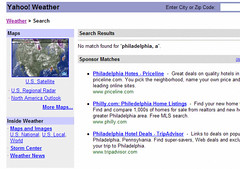 Michael Sippey writes in this blog post:
I mistyped a query in Yahoo Weather this morning, feeding it "philadelphia, a" instead of "philadelphia, pa" ... it told me there was no match found. But the sponsor matches worked just fine -- correctly figuring out that I was looking for Philly and offering up hotel deals and home listings.
Posted in Web/Tech
| Permalink
| Comments (5)
July 19, 2004 12:11 AM
Broken: Two-sided printing
 Dave Collins writes:
From Microsoft Word, all I want to do is print my doc on both sides of the page. So - what's "Duplex"?? Do I need to take a course in publishing to do this?
Update: Several readers have pointed out that the fault lies with the printer driver, not Microsoft Word.
Posted in Web/Tech
| Permalink
| Comments (9)
July 15, 2004 12:04 AM
Broken: Internet Explorer address problem
 Joshua Dunn writes:
Microsoft Internet Explorer has problems with redundancy. We can't find THIS web address - radio.yahoo.com - so would you like to look at THIS web address instead: radio.yahoo.com.
J. Zelinske points out a similar problem - searching for "www.google.com" yields the message:
We can't find "www.google.com"
...
Go to MSN Search to see complete results for "www.google.com".
...
Did you intend to go to one of these similar Web addresses?
www.google.com
www.gogle.com
www.gooogle.com
Posted in Web/Tech
| Permalink
| Comments (15)
July 1, 2004 12:01 AM
Broken: Verizon online phone book
 Charles Wasilewski points out that after searching Verizon's Yellow Pages for a business, you get the business's address. But you have to click on "phone" in order to view the phone number. How hard would it be to display the phone number along with the business address?
Posted in Web/Tech
| Permalink
| Comments (6)
June 25, 2004 12:01 AM
Broken: Amazon.com and LATimes.com forms
For the final day of Seth Godin Week at This Is Broken (to celebrate our one-year anniversary, having launched with Seth's original idea) we have two entries from Seth today.
First - Seth points out that Amazon.com solicited feedback from customers, promising $5 to anyone who completed the survey. Only one problem, as Seth writes:
So, I visit the site (above) and discover not one or three or ten multiple choice questions.
Sixty three.
What sort of person sits still for 63 multiple choice questions?
How scientific is the feedback if it's only from the people who answer 63 questions?
What concrete action can Amazon take with all this finely tuned statistical nonsense?
Read Seth's original post on Amazon's survey.
Second - Seth writes about the LATimes.com signup form, excerpted below:

Seth writes:
Notice that the box ISN'T checked. That's the universal symbol for, "We're honest and we want genuine permission from you before we send you stuff by email. So if you want it, please check here."
I was glad to see that. But then I read the text. It says that the UNchecked box means that they WILL send you spam unless you affirmatively CHECK it to say you DON'T want it. (Even without the ALL CAPS I'm adding, it's still confusing.)
So, let's be clear here: In order to ensure its future in a world where everyone is online, one of the great newspapers on the planet is relying on second order trickery (because ordinary opt out isn't nefarious enough). Do you really think they're building much of an asset here? Can you imagine that three years from now the publisher is going to say, "I'm sure glad we tricked a million people into having no leg to stand on when we busily spam them!" Hardly.
See Seth's original post on the LATimes form.
Posted in Web/Tech
| Permalink
| Comments (7)
June 17, 2004 12:01 AM
Broken: Register.com's submit to cancel
 Evan Williams, founder of Blogger, writes the following in a recent blog post:
Register.com automatically charges your credit card when your domains are up for renew. The email notifying you that your credit card has been charged contains a link for cancelling the charge, which bring you this page, which says, "To cancel this order, simply click Submit." Clicking Cancel, on the other hand, will cancel your cancellation request, thereby submitting your order.
ps - I hate to simply criticize without considering how I would solve the problem myself. So, without too much thought, how about, "Are you sure you want to cancel this domain? YES / NO."
Or something to that effect.
Posted in Web/Tech
| Permalink
| Comments (6)
June 4, 2004 12:01 AM
Broken: Macy's confirmation email
Phil Terry sends in the confirmation email Macy's sent him after he ordered a $150 gift card. Note how the email doesn't describe what he ordered in words a customer understands:
Thank you for shopping at Macys.com.
Your order is currently being processed. The details of your order are listed below.
Macys.com Order# 198175693
| PRODUCT DESCRIPTION | REQUESTED | AVAILABLE | SHIP DATE |
| EGC-MCDADSTD03 | 1 | 1 | 03/05/2004 |
.
.
.
Sincerely,
Macys.com Customer Service
http://www.Macys.com
MacysMailDesk@FDS.Com
1-800-289-6229
Our office hours are Mon - Sat 9am to 6pm, Sunday 11am to 7pm
Posted in Web/Tech
| Permalink
| Comments (8)
June 2, 2004 12:01 AM
Broken: Microsoft Windows file move
 J Nelson Chadderdon writes:
This screenshot is from my Windows 2000 computer. I was copying a single file copy, which was around 5MB large, between 2 computers sitting 10 feet apart. Both computers were connected by ethernet to my local area network. Notice the status window reads, "1118478 Minutes Remaining."
Posted in Web/Tech
| Permalink
| Comments (29)
June 1, 2004 12:01 AM
Broken: Yahoo! automatic keyword tagging
 Steve Hoffman writes:
This is a screenshot from the "Launch Music on Yahoo!" website. The website displays an article concerning Johann Sebastian Bach (1685-1750). However, the image is of Sebastian Bach, former Skid Row frontman! This is what happens when automatic keyword tagging goes wrong....horribly, horribly wrong!
Posted in Web/Tech
| Permalink
| Comments (4)
May 28, 2004 12:01 AM
Broken: ATM's changing buttons

 Adrian Howard writes:
The Yes/No buttons on my local ATM (Barclays Bank in the UK) switch positions depending on the operation. I'm always pressing the button that two screens ago was "Yes," and now, for no obvious reason, is "No".
Posted in Product Design
, Web/Tech
| Permalink
| Comments (14)
May 27, 2004 12:01 AM
Broken: iTunes censorship
 Paul Schreiber writes:
The iTunes music store is a bit censor-happy. They list "Moby Dick," by Herman Melville, as "Moby D**k."
This post ran in the June 2004 issue of "Popular Science." iTunes has changed the listing back to "Moby Dick" since we received this submission.
Posted in Web/Tech
| Permalink
| Comments (12)
May 24, 2004 12:01 AM
Broken: XBox error message
 Nowak writes:
Here's an error message from my XBox. It reads, "This is an Xbox game disc. Please put it in your Xbox to start playing." At least they were kind enough to write out the same error in multiple languages.
Posted in Web/Tech
| Permalink
| Comments (84)
May 13, 2004 12:02 AM
Broken: Yahoo! Weather forecast
 Mark Nelson writes:
Here is a not so uncommon occurrence when you check your local weather at Yahoo! Weather. You will often find that today's high will be a lower temperature then the current temperature. It can be argued that the high temperature is the forcast, but it still doesn't make much sense. If the forecast is wrong, shouldn't you update it?
Posted in Web/Tech
| Permalink
| Comments (14)
May 11, 2004 12:01 AM
Broken: Macromedia Central install
 Anthony Malloy writes:
I went to the Macromedia site hoping to download and install Macromedia Central. I clicked on the "Macromedia Central Install Now" button and got this great bit of information telling me that to install Macromedia Central I had to install Macromedia Central.
Posted in Web/Tech
| Permalink
| Comments (7)
May 7, 2004 12:01 AM
Broken: Amazon Gold Box price
 Chris Ruegsegger writes:
Late last year while looking for Christmas presents on Amazon I happened to run across this strange pricing error in my Gold Box. The regular price is "$69.99," but my special gold box price is "$71.95!" I have to wonder if anyone was duped into paying more for an item they saw in their Gold Box.
Posted in Web/Tech
| Permalink
| Comments (7)
May 4, 2004 12:01 AM
Broken: MSN 8 banner ad
 James Andrews writes:
This is a banner advertisement for the Microsoft Network 8. It reads, "With MSN 8, you can use Encarta multimedia to bring leaning to life."
Posted in Web/Tech
| Permalink
| Comments (7)
April 20, 2004 12:01 AM
Broken: Time.com over-page ad placement

 Mike Hyttinen writes:
An over-page ad is an idea which in itself is broken. This example drives the point home.
The first picture shows the lead photo appearing on the homepage of Time.com on Wednesday, August
20th, 2003. It shows the Canal Hotel in Baghdad burning to the ground. The second picture shows the homepage of Time.com after the ad has loaded. It is an ad for mortgage solutions from DiTech.com. Because it is an over-page ad, you can still see the cars burning in the background.
Posted in Web/Tech
| Permalink
| Comments (11)
April 19, 2004 12:01 AM
Broken: Amazon.com's personalized e-mails
 Nicholas Henry writes:
I received this e-mail from Amazon early this month. This is great example of broken personalization.
It reads:
"We've noticed that customers who have purchased The K&D Sessions also enjoy the work of Various Artists. For this reason, you might like to know that Various Artists's Sounds Good in the Nude is now available." Who doesn't enjoy the work of Various Artist?
Posted in Web/Tech
| Permalink
| Comments (6)
April 16, 2004 12:01 AM
Broken: MSN software list
 William Morris writes:
After recently rebuilding my Windows 2000 machine, I went looking for MSN Messenger as the final step in the process-- naturally I ended up at MSN.com.
As you can see from the picture, the version they're currently offering is for WindowsXP. The text clearly states: "If you are using a different operating system, please select another version on the left side of the screen." But there are no other versions listed there! There are no links here, or anywhere else that I could determine, that take you to previous versions anywhere on the website Luckily, we had a copy sitting on our server at work. Hard to develop for it if you can't find it...
Posted in Web/Tech
| Permalink
| Comments (9)
April 9, 2004 12:34 AM
Broken: Salon Premium signup (fixed!)
 Update June 8: Sumana Harihareswara, from Salon.com, writes us to say that this problem has been fixed:
Thank you for pointing out the problem with Salon's registration page on ThisIsBroken. As you may have noticed, we fixed the problem so now it'll work on Safari. I hope we cleaned the egg off our face in a relatively quick manner.
Thanks for the fix, Salon!
Here's the original post:
I tried signing up for Salon Premium yesterday and saw something unusual:
In the question, "Would you like to receive occasional e-mails regarding Salon Premium...", of course I wanted to select No. But both radio buttons were selected - Yes and No. I clicked on both and was unable to get either one to turn off.
(I went forward in the signup process anyway, and was blocked again when clicking "Submit" to confirm my credit card information brought me back to the same confirmation page.)
Thus I'm standing credit card in hand and still unable to sign up for Salon. This is broken.
P.S. I'm using Apple's Safari browser, v1.2.1, in OSX v10.3.3. Hardly an unusual configuration.
Posted in Web/Tech
| Permalink
| Comments (10)
April 8, 2004 12:01 AM
Broken: Five Star Billiards product list
 Chris Fralic sends us a pointer to the Product Quick Links page of the Five Star Billiards, Inc. website. This page lists hundreds of products in no discernable order. It should definitely not be called the "Quick Links" page. Chris adds, "It's almost a thing of beauty - there are patterns emerging in this sea of links..."
Posted in Web/Tech
| Permalink
| Comments (10)
April 5, 2004 12:01 AM
Broken: Microsoft Word cut and paste
Phil Terry writes:
You cannot paste into the "Find" window in Microsoft Word.
So if you have a word or phrase in a document that you want to find and replace, you have to retype it into the "Find" window. Wouldn't it be simpler if you could:
- highlight the word or phase
- copy it into the clipboard
- paste it into the find window
This would be easier and ensure that you have the exact match.
Related post: Microsoft Excel's
copy and paste feature.
Posted in Web/Tech
| Permalink
| Comments (27)
March 31, 2004 12:12 AM
Broken: Easy CD-DA Creator
 Martijn de Visser writes:
This is an error message displayed by Easy CD-DA Creator complaining to the user that it can't perform an operation, because it is already doing so...
Posted in Web/Tech
| Permalink
| Comments (9)
March 26, 2004 12:12 AM
Broken: Stockholm subway buttons
 Sarah Jensen writes:
These images are from the subway, or "tunnelbana" system, in Stockholm, Sweden. Two types of trains are in use these days: the old ones and the new ones. Both trains come equipped with "Open" buttons outside the trains' doors. Here's how the buttons work:
On the old trains:
During the winter the doors are kept closed, to keep the heat in, until the user presses the open button. During the summer the doors open automatically.
On the new trains:
The doors always open automatically, making the button completely irrelevant. In addition, there's a strange, circa 5 second pause (an eternity in the AM rush hour!) before the door opens, and I have often seen hopeful passengers pressing the "open" buttons to no avail. Since these buttons don't work I have no idea why they are on the trains at all!
Posted in Place
, Web/Tech
| Permalink
| Comments (11)
March 25, 2004 12:12 AM
Broken: Apple's iPod repair costs
 Dave J. Lowe writes:
This screenshot from Apple's Support page shows the cost to have any out-of-warranty iPod repaired. To have my first-generation 5GB iPod repaired (faulty hard-drive), I would pay $255.95 to receive a replacement first-generation 5GB iPod. That's roughly the same price as a brand new third-generation 10GB iPod! When I called their repair hotline about it, they eagerly advised me to just buy a brand new iPod. An Apple Store employee advised me to sell it on eBay. Good customer experience? Something's definitely broken here.
Posted in Web/Tech
| Permalink
| Comments (280)
March 23, 2004 12:12 AM
Broken: Healthcare website login
 J.E. writes:
Got this message when I entered in what I thought was my username and
password. Great security requirement-- the password needs to be the same as the username!
Posted in Web/Tech
| Permalink
| Comments (5)
March 15, 2004 12:30 AM
Broken: Flight arrival monitor
 Amaury Jacquot writes:
I took a picture of this flight arrival monitor at the Las Vegas McCarran airport. You'd expect these to be pretty simple systems, with some sort of embedded OS. Think again! They use Windows 2000 Professional, and thus crash every now and then.
Posted in Travel
, Web/Tech
| Permalink
| Comments (18)
March 5, 2004 12:30 AM
Broken: Encarta status bar
 SH from Denmark sent this status bar he saw while installing Microsoft Encarta 2004. Above the status bar reads this text:
Please note that the progress bar may reach the end before all files have been copied. Please be patient.
In other words, "Our status bar doesn't work right. So please don't pay any attention to it."
This isn't some two-bit shareware program with a broken status bar, this is one of Microsoft's most popular software applications. And the text shows that Microsoft already knows about the error.
Posted in Web/Tech
| Permalink
| Comments (15)
February 24, 2004 01:06 AM
Broken: Redundant Amazon page
 Kathleen Balson writes:
I saw the title of a book I might look to buy (on a site - not Amazon), so I clicked on it... And Amazon (being so helpful) dutifully told me that I had clicked on the book... I know I clicked on it, because I clicked on it! It's not like I would forget that I clicked on it...
So what do I do next?
I ended up scrolling down (the rest of the page offers some other books I might like to click on, and other unrelated and useless links), then finally clicked on the title to see more about the book. Why does this page exist? I've never encountered it before now. It certainly didn't help me in any way - except for a laugh.
By the way, for those This Is Broken readers living in New Orleans and other places that celebrate the day: Happy Mardi Gras! -mh
Posted in Web/Tech
| Permalink
| Comments (8)
February 23, 2004 12:56 AM
Broken: Madrid Metro TV screens
 Mark Waters writes from Madrid:
The Madrid Metro (subway) TV channel runs on Windows 2000 Professional, that is, when it runs at all.
The attached picture shows an error message 'File Not Found', proclaimed proudly for all the world to see. This appears on screens at the subway stops and on the trains themselves.
I have also witnessed the following:
- 'It is now safe to shutdown your computer'
- Memory address errors
- 'Loose cable or connection' errors
- 'Cannot find Wireless Network'
- The Windows Desktop with Explorer open and the directory structure and files visible to the world.
- and of course the infamous 'CRTL-ALT-DEL' blue screen
I imagine that commuters who are computer users and are travelling home from the office after another day of struggling with Windows must feel they are living a waking nightmare. I can't imagine how those commuters who are not familiar with Windows digest all the warnings and alerts which the Metro TV is spewing at them.
I hope they're using something more robust for the signalling system.
Posted in Travel
, Web/Tech
| Permalink
| Comments (6)
February 20, 2004 12:50 AM
Broken: Amex forgot-password form
 Susan Herbst writes:
I was trying to log in to my American Express account but couldn't remember my password. When I followed the "Forgot your Password?" link, I was asked to answer a security validation question. Problem is, not only did I have to answer the question, but I also had to choose the correct question to answer. If I can't even remember my password, what are the chances I'll remember what question to ask?
Posted in Web/Tech
| Permalink
| Comments (7)
February 17, 2004 12:30 AM
Broken: Microsoft Excel clipboard
Vanya Tucherov writes:
Just found a really annoying and severely broken behaviour in Excel involving data placed on the clipboard.
To reproduce:
- Open two or more Excel spreadsheets.
- Select multiple rows and columns in one of the spreadsheets
- Copy this data (Ctrl+c)
- Switch to another sheet.
- Type something in a cell on the "target" spreadsheet.
- Attempt to paste the data from the "source" spreadsheet via the clipboard to the "target" spreadsheet.
Broken: Excel behaves as if the clipboard is empty. Opening the clipboard shows that, indeed, it has no content on it. The clipboard was erased!
Of course, adding data to the target spreadsheet shouldn't empty the clipboard. This is a silent failure within Excel for no apparent reason.
Posted in Web/Tech
| Permalink
| Comments (9)
February 11, 2004 12:58 AM
Broken: Caps Lock
 Jan Jursa writes from Germany:
After years of suffering, trouble and pain I finally fixed my keyboard. I will never ever again touch the Caps Lock accidentally. The harassment's over.
Isn't the Caps Lock key one of the most annoying things on every keyboard? I think I can honestly say I have NEVER used this key purposely in the past 15 or 20 years.
[Not only that, but on Windows PC's the all-important CTRL key is in the least accessible position: lower-left. Why not switch the positions of CTRL and Caps Lock? -mh]
Posted in Product Design
, Web/Tech
| Permalink
| Comments (34)
February 10, 2004 02:48 AM
Broken: FrontPage banner ad
 Kurt Morris writes:
Don't know how long this will be available, but this ad for FrontPage is priceless. Look at line 28. Oops!
[For the non-Web designers reading This Is Broken: the ad promises that FrontPage has "cleaned up our act," but there's an error in the HTML code displayed in the ad. On line 28, there shouldn't be a slash before the "p". -mh]
Posted in Advertising
, Web/Tech
| Permalink
| Comments (21)
February 3, 2004 03:20 AM
Broken: JavaScript error message
 Thanks, but I'd rather not... I saw this strange JavaScript error today while shopping on the online FileMaker store.
(By the way, FileMaker is a great product. Its online store is not.)
Posted in Web/Tech
| Permalink
| Comments (11)
February 2, 2004 11:45 AM
Broken: "Contact" page
 Dana VanDen Heuvel points us to his review of the SPSS.com "Contact" page.
Upon clicking on the "Contact Sales" button, I'm asked to login. You want me to WHAT? Login? To your site? You mean, I have to get a username and password to your site just to have someone call me to try to sell me something?
Posted in Web/Tech
| Permalink
| Comments (2)
January 26, 2004 03:00 AM
Broken: DVD Genre menu
 Jack Kelly writes:
While searching the Warner Brother Home Video site, my search came up empty. (To be fair, the search was "broken" due to my typo.) Then I decided to browse by Genre for my selection, and the last visible option in the pull down before having to scroll down is "DVD Favorites Under $1."
Of course, it's actually "Under $10", and there are some other selections that are cut off as well. But with all that white space to the right, there's no reason to have these cut off.
Posted in Web/Tech
| Permalink
| Comments (2)
December 29, 2003 03:03 AM
Broken: PeopleSoft save error
 Kevin Montgomery writes:
I've attached a fun error message from PeopleSoft for your entertainment. Basically, it says you need to fill in a field. However, that field may be somewhere else, and it may be invisible. VERY useful!
Posted in Web/Tech
| Permalink
| Comments (2)
December 23, 2003 03:30 AM
Broken: iTunes censorship
 Paul Schreiber writes:
Oddly, song #2 is censored, but #3 is not. Heh.
Posted in Web/Tech
| Permalink
| Comments (9)
December 15, 2003 03:44 AM
Broken: MS Word dialog box
 Brad MacBeth writes:
Here's a treat from Microsoft Word 2002.
Remember, MS Word doesn't like too much editing!
Posted in Web/Tech
| Permalink
| Comments (7)
December 8, 2003 03:28 AM
Broken: Reset button on any lengthy form
 Dan Cummins writes:
After filling out a lengthy online form [like the one shown here], almost everyone will want to click the Go button to submit the form.
But why is the Reset button placed so close to the Go button? Who would intentionally click the Reset button after filling out a lengthy online form? Plus, many will accidentally click the Reset button, leading to some frustrated visitors!
The message is clear - move or remove the unnecessary Reset buttons.
(I found this on www.homeplans.com, in Advanced Search.)
Posted in Web/Tech
| Permalink
| Comments (12)
November 17, 2003 01:32 AM
Broken: Pasting Yahoo Maps directions
 Kerah Pelczarski writes:
Yahoo! Maps driving directions use "R" and "L" images instead of plain text for right and left.
Please see tinyurl.com/t39k or attached image.
This is bad because when you copy and paste the directions in order to sync them to a PDA, the all-important right and left directions are missing. A 50/50 chance of going the right way isn't quite good enough. ;)
Here's the text from the above example:
1. Starting at the center of zip code 94043 on LINDA VISTA AVE - go < 0.1 mi
2. Turn on W MIDDLEFIELD RD - go 0.4 mi
3. Turn on MOFFETT BLVD - go 0.3 mi
4. Arrive at 215 MOFFETT BLVD, MOUNTAIN VIEW
Posted in Web/Tech
| Permalink
| Comments (10)
November 11, 2003 12:03 AM
Broken: Software error message
 Gabriel Tinnaro writes:
Well, did it, or didn't it? I love those "WARNING: EVERYTHING IS OKAY"
messages...
Classic mixed message.
Posted in Web/Tech
| Permalink
| Comments (3)
November 6, 2003 03:03 AM
Broken: Software error
 Alex Pavloff writes:
Blue, huh? The software must be sad.
Posted in Web/Tech
| Permalink
| Comments (11)
November 4, 2003 03:01 AM
Broken: Ticketmaster feature
 Drew writes:
Ticketmaster.com's "ticketFast" feature enables you to print your ticket after ordering. Great idea in concept, but they blew it by assessing a fee for this service. So - in addition to the $6.75 "convenience" charge per ticket, and the $3.05 "order" charge, Ticketmaster will allow me to pay an extra $2.50 for the privilege of using my own paper and ink to print a ticket?
No thanks, I'll let them incur the postage and will instead pocket the savings.
Posted in Web/Tech
| Permalink
| Comments (8)
November 2, 2003 03:10 PM
Broken: Security in Microsoft Windows
Walt Mossberg, the Wall Street Journal's personal technology columnist, writes this in his October 23 column:
Windows is riddled with security flaws, and new ones turn up regularly. It is increasingly susceptible to all kinds of viruses, malicious Trojan horse programs and spyware. As a result, Windows users have been forced to spend more of their time and money supporting their computers.
Mossberg suggests a simple fix:
...for consumers and small businesses, there's a simple way out of this endless morass: Buy an Apple Macintosh computer. There are no viruses on the Macintosh's excellent two-year-old operating system, called OS X. And the Mac is a terrific computer -- as good as, or better than, Windows for the typical computing tasks important to mainstream users.
Posted in Web/Tech
| Permalink
| Comments (21)
October 27, 2003 08:19 AM
Broken: Rebate instructions
 S. P. writes:
The rebate depends on place where you purchased the product, yet they tell you to call the same exact number for both. What's the point?
Posted in Web/Tech
| Permalink
| Comments (2)
October 16, 2003 08:44 AM
Broken: Contextual Web ads
 Adam Clayman writes:
This is a screen grab I made some months back from Wired.com. The contextual Web ads failed here. The article decried the use of PowerPoint. This didn't stop the advertisers.
The article reads, "PowerPoint is evil." The ads read, "Microsoft Powerpoint Sale - Powerpoint 2002 at sale prices"; "MS PowerPoint Training"; "Huge savings and selection." Click the graphic to zoom in..
Posted in Web/Tech
| Permalink
| Comments (1)
October 10, 2003 10:27 AM
Broken: Windows "copying" message
 Ben O'Hear writes from Spain:
I know copying a jpeg graphics file is a lot to ask from poor old 233mhz PC running Windows 2000. But 8.5 years?!
Posted in Web/Tech
| Permalink
| Comments (1)
October 6, 2003 10:36 AM
Broken: Weather.com temperature
 Erich Neumann writes:
Self explanatory, from Weather.com. Dayton, Ohio always claimed to be a hot place to be....
Posted in Web/Tech
| Permalink
| Comments (5)
October 2, 2003 10:40 AM
Broken: Blackberry Phone/PDA
 Julie Stanford writes:
I recently had the misfortune to try out a RIM Blackberry 6210 Phone/PDA
for a week. The button to end a call is located in the EXACT location where your right thumb sits on the Blackberry during a call. On numerous occasions, I accidently hung up on people while I was holding the phone.
Another broken feature appears when another call comes in. The call-waiting options encourages you to hang up on people: The first and default option is "answer new call and hang up on current call." Second is "answer new call and hold current call," and third is "don't answer." I can't believe that the default is to hang up on the current person -- an option that I chose on two occasions when I accidently clicked the thumb roller when attempting to navigate to option 2.
This device is very broken.
Posted in Product Design
, Web/Tech
| Permalink
| Comments (5)
September 30, 2003 10:48 AM
Broken: Windows error
 Julian Graham writes:
The screenshot was taken on Windows 2000 Professional while trying to free up some disk space. Apparently, file deletion requires the use of some kind of disk cache, which, of course, may be unavailable if your disk is full.
This message struck me as a great example of why Microsoft's filesystem code is particularly broken.
Posted in Web/Tech
| Permalink
| Comments (7)
September 26, 2003 10:54 AM
Broken: Net connection sign
 Meg Lauber writes:
We were in Vancouver recently, and while waiting at the Pacific Central train station we noticed these signs.
I wasn't brave enough to see if there actually was a computer in there, much less whether it was hooked up to an outbound network.
As always, click the graphic to see the whole story...
Posted in Signs
, Web/Tech
| Permalink
| Comments (8)
September 25, 2003 10:56 AM
Broken: Banner ad
 Jay Bienvenu writes:
I snapped this on weather.com last year as Tropical Storm Isidore approached the Louisiana coast. I live in south Louisiana and was monitoring the storm. Reserving a tee time was high on my priority list at the time. :) Though it might have helped my score!
The ad in question was part of a set of mini-ads that rotated at that location. It appears that weather.com has removed the ad.
Posted in Advertising
, Web/Tech
| Permalink
| Comments (2)
September 22, 2003 11:00 AM
Broken: ATM buttons
 Rui Patrício writes from Portugal:
Here's a nice picture of an ATM in Portugal with the buttons in the wrong order.
Update Oct 2: Bruno Figueiredo writes from Portugal that this is "not an error in design. Vandals take off the buttons with a knife and glue them back on in a different order."
Posted in Web/Tech
| Permalink
| Comments (4)
September 12, 2003 11:28 PM
Broken: Store hours
 Andrew Rollason writes from London:
I was just about to pick up some groceries from the Marks and Spencer store down the street.
The website has a decent online store finder, but unfortunately their opening hours are shown as a decimal.
Posted in Web/Tech
| Permalink
| Comments (6)
September 10, 2003 11:31 PM
Broken: Blackout photo
 This "photo" of the northeast U.S. blackout was passed widely around the Internet.
Unfortunately, it's a fake.
As described on this page, someone apparently grabbed an old satellite image from the NASA website, then used Photoshop to black out the appropriate part of the image. An easy but effective hoax.
The lesson: Don't trust anything you receive via e-mail unless you check the source online (i.e. via the Web address) - and don't forward it along to anyone else. If there's no Web address listed, don't trust what you see.
Posted in Web/Tech
| Permalink
| Comments (7)
September 9, 2003 11:32 PM
Broken: Macy's outdoor display

 Fred McCann writes:
I almost walked right past this on the way to work. This is the big Macy's sign on the corner of 34th and 7th in Manhattan. [Picture taken August 4, 2003]
 Update Aug. 25, 2005: The original two pictures are down, but Billy Scott supplies us with this more recent example from summer '05.
Posted in Place
, Web/Tech
| Permalink
| Comments (8)
September 5, 2003 11:35 PM
Broken: Same-day delivery
 Barnes & Noble (bn.com), based here in New York City, offers to deliver almost any product same day for customers in Manhattan. That's pretty bold, setting such a high expectation.
The last time I ordered from bn.com, the "same day" delivery took several weeks to arrive. I alerted them via e-mail and never received an apology, let alone any compensation. That was two years ago, and I've never ordered from them since.
Now Phil Terry writes in with his recent experience on bn.com:
I experienced a problem with Barnes & Noble's (supposedly) Same Day Delivery in Manhattan when the courier service did not get to the delivery location until after 7pm. The name "Same Day Delivery in Manhattan" seems to imply guaranteed same day delivery; however, when you read the fine print, you find out that the service is in fact not guaranteed.
This isn't meant to bash bn.com. I'm sure that the site does lots of things well, they're all good people, etc. The point here is that when you set a high expectation with customers, you
have to deliver on that - and not hide behind the small print - otherwise, customers are likely to leave forever.
Posted in Web/Tech
| Permalink
| Comments (1)
August 29, 2003 06:00 AM
Broken: Seminar invitation

Luis Sotomayor writes from Buenos Aires:
The screen shoot I'm sending you is a e-mail confirmation from Adobe. They invited me to a seminar by e-mail, and I registered by e-mail. That much worked fine.
But if you know a little Spanish you will see the funny side of this: The seminar title is "Network Publishing - Mas Alla Del Papel," which means "Network Publishing - Beyond Paper." Now notice what they write in the e-mail invitation: "Recuerde concurrir al evento con este mail impreso en papel," which means something like "Remember to arrive at the event with this e-mail printed on paper."
After several e-mails back and forth about a seminar about "beyond paper," they need a printed paper for registration. Crazy, isn't it?
Posted in Web/Tech
| Permalink
| Comments (2)
August 28, 2003 06:00 AM
Broken: Sending a link via Microsoft software

Mike Boyink writes:
I just discovered this when a client tried to send me a URL via Microsoft Internet Explorer and Outlook.
- In Internet Explorer she chose the "File" menu, then "Send", then "Link By Email".
- Outlook showed the e-mail with the message, "Your files are attached and ready to send with this message." She then clicked Send.
- When I received it (in my own Outlook), I clicked the link and got a "page not found" error. I also missed the error message that accompanied the link.
Broken: Bad send interface; bad receive interface; hidden error message; and no reason for the error in the first place. In Mike's words, "All this when just pasting the URL into the e-mail body would work!"
See the
screenshots to see the sequence of events.
More generally, given the recent e-mail worm, some are arguing that Microsoft Windows itself is broken:
Posted in Web/Tech
| Permalink
| Comments (7)
August 22, 2003 06:00 AM
Broken: BA.com Contact Us page
 Marc Mcneill points out a surprisingly bad experience on British Airways' website, BA.com: clicking on "Contact Us" at the top of any page takes the user to a search results page. The first result is "Travel With Confidence - Travel Advice." Other prominent links, called out in color:
Travellers advice relating to SARS
New - British Airways Early Bird Autumn Sale
Suspended services to Saudi Arabia
Gee, what
could the user be searching for, clicking on "Contact Us"? (On the bright side, the page only shows the first 10 of 393 search results.)
Posted in Web/Tech
| Permalink
| Comments (1)
August 20, 2003 06:00 AM
Broken: AT&T cell reception
 Why does my AT&T cell phone drop calls for no reason? Today I was in the not-so-foreign location of Park Avenue and 65th Street in Manhattan. My call dropped off abruptly, after which the phone mocked me by showing a full four bars on the antenna display.
A cell phone might take pictures, send messages, check e-mail, feed the dog, and mow the lawn; but if it can't carry a phone call in midtown Manhattan, it's broken. Fix your coverage, AT&T.
Posted in Web/Tech
| Permalink
| Comments (16)
August 19, 2003 06:00 AM
Broken: Product feature list
 Richard Dressner pointed this one out. Growinglifestyle.com carries a Toro 12-Volt Cordless Trimmer with a strange item on the feature list. Richard writes:
It's a battery-powered trimmer, so how come "Exclusive extension cord-lock prevents disconnects"?
Posted in Web/Tech
| Permalink
| Comments (5)
August 12, 2003 06:00 AM
Broken: Sprint DSL installation
 Royce Shin notes that in Sprint's DSL installation kit, "both the CD and the modem demand to be installed first." Also broken: There's a large sticker reminding you to install the modem first... it's stuck on the modem. This does nothing for people who throw the CD in first. As Royce notes:
I assume that the scarier lettering on the modem takes precedence, but the sticker probably would've been more helpful on the CD case. Presumably those who read the modem sticker would already have made the choice to start with the modem or would be too late to do anything about it.
Posted in Web/Tech
| Permalink
| Comments (4)
August 4, 2003 06:00 AM
Broken: E-mail-to-Web handoff
Phil Terry forwards the monthly update of the American Museum of Natural History, which includes a promo for "reefer madness" in Australia:
>____________________________________________________________

>************** D I S C O V E R Y   T O U R *****************

>____________________________________________________________

>

>Reefer madness in Aussieland!  Get up close and personal with the

>Great Barrier Reef on this amazing snorkeling adventure.

>

>http://www.amnh.org/go/?url=programs/discotours/?src=july03

The e-mail promo is fine. What's broken is
the page you get when you click on the link. There's no mention whatsoever of the Australia trip. As Phil notes, "To find the Barrier Reef adventure, you have to click By Region and then scroll down two screens to find it."
Posted in Advertising
, Travel
, Web/Tech
| Permalink
| Comments (2)
August 1, 2003 06:00 AM
Broken: Cable company phone message
Jess Durrant writes:
If you call the Minneapolis/St. Paul area Time Warner Cable phone number, you're forced to go through the menu system. After going through three or four menu selections, you get a message that "Time Warner Cable's offices are currently closed. Please call back during the next business day."
There are so many problems with this, I can't even fathom who thought this was a good idea.
- If you wait through the message twice you actually do get through to an operator, but they don't tell you that.
- During non-business hours they don't tell you upfront that they are closed, so you're always forced to try to get through, only to find out you can't.
- They never clarify what their business hours are.
- You get to this message at all times of day, 7 days a week. So every single time I've had to deal with TWC, I've had to just wait on the line until I get an operator because you nearly always get the "closed" message.
Posted in Misc
, Web/Tech
| Permalink
| Comments (7)
July 31, 2003 06:00 AM
Broken: JetBlue order form
 Leanne Waldal writes:
With my system fonts set to large -- I have bad vision and can't deal with the font sizes that Web developers force on me -- notice that the day of the week for the first step of the reservation system is cut off. The date is actually july 11, not july 1 as it appears. I reported this to JetBlue in May (via their website form) but never heard anything back and they still haven't fixed the problem.
Posted in Web/Tech
| Permalink
| Comments (8)
July 29, 2003 06:00 AM
Broken: CD burner installer
 In this column, Cody B. writes about faulty navigation in the installer of a CD-burning application:
What button do you click to install PrimoCD? The one on the right looks like a good choice; it seems to suggest "continue". But the program exited. Restarting the setup program and holding the mouse pointer over the right-hand icon, I noted that, in fact, its tooltip read "Exit the browser"!
Posted in Web/Tech
| Permalink
| Comments (4)
July 24, 2003 06:00 AM
Broken: BuyMusic.com album page
 Charles Rubin points out this album page at BuyMusic.com (click to zoom in):
At first you see that you can buy individual tracks
I get excited to buy an individual track
There are no individual tracks
The page says both that you
can and
can not buy individual tracks. See live page on BuyMusic.com
here.
 Update
:
Cody B. points out another major flaw in BuyMusic.com - it only allows Windows users running Internet Explorer into the site. Whoever heard of browser requirements just for the privilege of looking at a home page?
Update Aug 1, 03: Several readers have pointed out that BuyMusic.com is not available for users outside the U.S. Why not share?
Posted in Web/Tech
| Permalink
| Comments (1)
July 16, 2003 06:00 AM
Broken: interface: Error message
 David Broschinsky points out this strange error msg (click to zoom in). He notes: "I can change the settings, but can't see them?"
Posted in Web/Tech
| Permalink
| Comments (3)
July 11, 2003 06:00 AM
Broken: Application error message
 Theis Søndergaard writes:
This screenshot is from our own administration module for orders and payments. It has been corrected :)
Posted in Web/Tech
| Permalink
| Comments (1)
July 9, 2003 06:00 AM
Broken: Sign on wall jack
 Paul Schreiber took this photo at the Vancouver airport recently.
Sometimes if you need a sign at all, it's a flag that something is broken..
Posted in Misc
, Web/Tech
| Permalink
| Comments (3)
July 3, 2003 06:00 AM
Broken: Broken weather websites
fixed!
Update, July 21: Both Yahoo Weather and Weather.com have fixed the behavior detailed in our July 3 post (see below). As of July 21, searching for "New York City" on either site takes the user directly to the New York weather page.
To the teams at Yahoo Weather and Weather.com... thanks for the fix! Nice work.


 Original July 3 post: Both Weather.com (pointed out by Ryan Olshavsky) and Yahoo Weather (I found) have trouble with their search results.
Search Weather.com for "San Francisco" and you'll be asked if you mean the one in Argentina. Search on "San Francisco, CA" and you get the same question: do you mean the "San Francisco, CA" in Argentina?
Search Yahoo Weather for "New York City" and you get (as we say in Manhattan) bupkus. Only a list of possible cities, and not one of them is New York City. (Click on the images to zoom in.)
Posted in Web/Tech
| Permalink
| Comments (2)
June 24, 2003 06:00 AM
Broken: Airport Windows errors

 Lukas Oberhuber risked life and limb to take these pictures in European airports. The obvious question to the airline: If you can't keep your Windows-based displays from reverting to DOS error messages, do I really want to fly on your planes?
(Click the images to zoom in.)
Posted in Travel
, Web/Tech
| Permalink
| Comments (12)
June 23, 2003 06:00 AM
Broken: Bank homepage search
 Go to www.bankofny.com - the Bank of New York, the bank that Good Experience, Inc. uses - and search from home page for "merchant account". Guess what comes up: the exact same home page, again. No results page at all.
P.S. June 27 update: Stefani Pritchard reminds us that "the search function works properly when the user clicks on the 'Submit' button. But for the many experienced computer users who assume the return/enter key serves the same purpose, the result is a screen refresh. Definitely broken."
(Click the image to zoom in.)
Posted in Web/Tech
| Permalink
| Comments (2)


 Jeremy Teale writes in:


